

Description
a key that can be used to create a portable house
Mod Wiki
Pocket Realm Key
Quickstart
- Find Portalium Ore underground in the Overworld and mine it with an iron-tier pickaxe or better to get Portalium.
- Craft the parts and key: Key Frame, Pocket Core, then Pocket Realm Key. These recipes are unlocked when you join.
- Use the key. Its first use binds it to you; right-click enters or leaves your realm, while Shift + right-click opens its settings.
- Try changing the realm size, then enable flight or mobs if you want them.
Overview
Each owner has a personal pocket realm. The key takes you there and brings you back to your last location. The realm is created when you first enter, with a stone floor; its size, flight, mobs, and guest access are configurable.
What It Adds
| Content | Use |
|---|---|
| Pocket Realm Key | Bound to its first user; travels to and from that owner’s realm. |
| Portalium Ore and Portalium | Ore generates underground in the Overworld and drops Portalium when mined with an iron-tier tool or better. |
| Key Frame and Pocket Core | Crafting components for the key. |
| Rift Block | Generates underground in the Overworld and drops itself when mined with an iron-tier tool or better. |
| Cursed Rift Glue and Cursed Rift | Additional items. |
How To Use
- Enter or leave: Right-click the key. On your first use, the key binds to you and creates your realm. Entering saves your current location; using a key while in the pocket realm returns you there.
- Configure your realm: Shift-right-click your own key. Use − and + to set the interior size, the Flight and Mobs buttons to toggle those options, and the player arrows and access button to manage guests.
- Invite a player: Select an online player and change their access to Allowed. They receive a key bound to your realm. Change access back to Denied to revoke entry.
- Build and explore: The initial floor is stone. You can build on it; changing the size updates the floor to match.
Crafting And Obtaining
Mine Portalium Ore with an iron-tier pickaxe or better to obtain Portalium. The three key recipes are:
Rift Block is another underground Overworld find. It drops itself when mined with an iron-tier pickaxe or better.
Abilities And Mechanics
- The starting realm size is 32 blocks. Use the settings buttons to adjust it from 16 to 64 blocks, in steps of 8.
- Flight and mobs start Denied. Allowing flight grants flight while players are in the realm; denying it removes flight granted by the realm. Denying mobs clears existing mobs from the realm.
- The realm boundary returns players to its center if they go beyond the configured area.
- Realm settings and guest access are saved with the world. Only the owner can change settings. A guest’s key grants entry only while their access is allowed.
Recipes





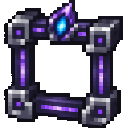
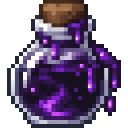
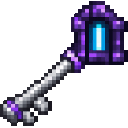
How to install
This Java mod can be used on Windows and Mac PCs with the CreativeMode Launcher or any Minecraft launcher of your choice.

1. Download and install the new CreativeMode Launcher
2. Click to play on the top of the screen.
3. That's it — launches instantly. No complicated setup required.
Want to use on a different launcher? Download mod and manually install.
This mod is licensed under the CreativeMode Mods License.