

Description
Face the fast, powerful Pink Fury Beast roaming the Overworld, then use its heart for healing, strength, and speed.
Mod Wiki
Pink Fury Beast
Quickstart
- In Creative mode, use a Pink Fury Witch Spawn Egg on the ground to summon one. Otherwise, look for the creature roaming the Overworld.
- Craft a Fury Knife with an iron ingot and a stick:


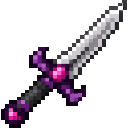
- Defeat the creature yourself to obtain a Fury Heart. Hold the heart and use it to restore health and gain combat buffs.
Overview
The Pink Fury Beast is named Pink Fury Witch in-game. This fast, powerful Overworld monster wields a Fury Knife and fights at close range.
What It Adds
- Pink Fury Witch: A hostile creature that can appear naturally in the Overworld or be summoned with its spawn egg.
- Fury Knife: A craftable weapon, also wielded by the creature.
- Fury Heart: A consumable reward for defeating the creature as a player.
How To Use
Use a Pink Fury Witch Spawn Egg on a block to spawn the creature. In survival, it can also be encountered while exploring the Overworld.
Craft and equip a Fury Knife before a fight if you want to use the same weapon it carries. Be ready for a fast, hard-hitting opponent.
Crafting And Obtaining
The is made with an iron ingot above a stick.
A Pink Fury Witch drops a Fury Heart when killed by a player.
Abilities And Mechanics
Using a Fury Heart consumes one and:
- Restores 6 health points.
- Grants Strength II and Speed I for 30 seconds.
- Applies a 20-second item cooldown.
The creature has 54 health points and deals 12 attack damage before armor. Keep your distance where possible, and avoid letting it close in.
Progression And Strategy
Craft a Fury Knife, then take on the Pink Fury Witch for a chance to turn the fight’s reward into a burst of healing and combat buffs. Save Fury Hearts for moments when you need the health or an edge in a difficult fight.
How to install
This Java mod can be used on Windows and Mac PCs with the CreativeMode Launcher or any Minecraft launcher of your choice.

1. Download and install the new CreativeMode Launcher
2. Click to play on the top of the screen.
3. That's it — launches instantly. No complicated setup required.
Want to use on a different launcher? Download mod and manually install.
This mod is licensed under the CreativeMode Mods License.