

Description
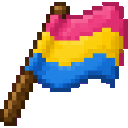
Craft and carry the Pan Pride Flag, celebrating pan pride in every adventure.
Mod Wiki
Pan Pride Flag
Quickstart
- Gather a white banner, pink dye, yellow dye, and blue dye.
- Craft the flag:


- Place a fence where you want to display it.
- Hold the Pan Pride Flag and use it on the fence. The flag is placed directly above the fence.
- Try placing several flags along a fence line to create a larger display.
The flag can stack up to 64 items. If the space above the fence is occupied, placement fails and the item is not consumed.
Overview
Pan Pride Flag adds a decorative Pan Pride Flag item that can be carried, crafted, and displayed in the world. Its tooltip identifies it as an LGBTQ+ pan flag.
What It Adds
- Pan Pride Flag — A placeable decorative flag.
- A crafting recipe using a white banner and pan pride colors.
- An entry in the Colored Blocks creative inventory tab.
- A fence-mounted display block that drops the flag when broken directly.
How To Use
Carrying
The flag is a normal inventory item and can be carried in stacks of up to 64.
Placing
The flag must be supported by a fence:
- Place a fence.
- Make sure the block directly above it is empty.
- Use the flag on the fence.
The flag is placed in the space above the fence, with its orientation set automatically from your horizontal facing.
Breaking
Break the flag normally to collect it again. Removing the fence beneath it causes the flag to disappear because it can only survive while supported by a fence.
Crafting And Obtaining
In Survival, craft one Pan Pride Flag with:
- 1 white banner
- 1 pink dye
- 1 yellow dye
- 1 blue dye
In Creative mode, find the flag in the Colored Blocks tab.
Abilities And Mechanics
- The flag is decorative and has no combat, mining, or special-use ability.
- It can only remain placed directly above a fence.
- A non-air block above the fence prevents placement.
- The flag does not occupy a full solid block space, allowing it to function as a banner-style decoration.
- Directly breaking the placed flag returns a Pan Pride Flag item.
Display Ideas
- Line a path or entrance with flags.
- Place flags around a community area or celebration space.
- Use different fence materials to create contrasting displays.
- Build rows of fences at different heights for layered flag decorations.
How to install
This Java mod can be used on Windows and Mac PCs with the CreativeMode Launcher or any Minecraft launcher of your choice.

1. Download and install the new CreativeMode Launcher
2. Click to play on the top of the screen.
3. That's it — launches instantly. No complicated setup required.
Want to use on a different launcher? Download mod and manually install.
This mod is licensed under the CreativeMode Mods License.