

Description
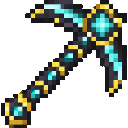
Reveal nearby hidden ores with every strike of the Oreglow Pickaxe.
Mod Wiki
Oreglow Pickaxe
Quickstart
Craft the Oreglow Pickaxe, equip it in your main hand, then use it to break an ore block. Nearby ores will be marked with cyan outlines visible through blocks for up to two minutes.


Overview
The Oreglow Pickaxe helps you locate nearby ore veins while mining. Its reveal effect is personal: only the player who triggered it sees the highlights.
What It Adds
One pickaxe that can mine pickaxe-mineable blocks and reveal nearby coal, iron, gold, diamond, emerald, lapis, redstone, and copper ores, as well as Nether quartz ore, Nether gold ore, and ancient debris.
How To Use
- Break an ore block with the Oreglow Pickaxe in your main hand to trigger a search.
- The search covers a 16-block radius around the ore you broke and can mark up to 128 ore blocks.
- Found ores remain highlighted for up to two minutes. Breaking another ore with the pickaxe adds nearby discoveries and refreshes the timer.
- Highlights disappear as the marked blocks are mined or cease to be ores.
Crafting And Obtaining
Craft the pickaxe with diamonds, glowstone dust, an amethyst shard, and a stick using the recipe above. You can also find it in the Tools and Utilities tab in Creative mode.
How to install
This Java mod can be used on Windows and Mac PCs with the CreativeMode Launcher or any Minecraft launcher of your choice.

1. Download and install the new CreativeMode Launcher

2. Click to play on the top of the screen.
3. That's it — launches instantly. No complicated setup required.
Want to use on a different launcher? Download mod and manually install.
This mod is licensed under the CreativeMode Mods License.