Description
Netherite companions who follow, fight, trade, and reward you every day
Mod Wiki
Netherite Companions
Quickstart
- Craft a Companion Call Charm using the recipe below.
- Use the charm to open the Netherite Companion menu.
- Select Call / find companion to summon your personal companion nearby.
- Interact with your companion at any time to hear a greeting.
- Gather emeralds and open the menu again to trade for enchanted gear.
- Open the menu once per Minecraft week to claim rare loot and temporary buffs.
Overview
Netherite Companions gives you a loyal, fire-immune bodyguard that follows you, fights nearby hostile mobs, and offers gear and rewards through a simple trading menu. Everything is managed through one special item — the Companion Call Charm — which acts as your remote control for summoning your companion, trading for equipment, and claiming a weekly gift.
What It Adds
- Netherite Companion — a durable, fire-immune ally entity that stays near you and attacks nearby monsters automatically.
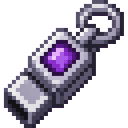
- Companion Call Charm — an item that opens the companion menu for summoning, trading, and rewards.
- Enchanted Companion Sword — a powerful pre-enchanted netherite-tier weapon.
- Enchanted Companion Chestguard, Leggings, and Boots — a matching set of pre-enchanted protective armor.
How To Use
- Summoning: Use the Companion Call Charm and choose "Call / find companion" to spawn your companion near you. If one already exists, it will be located instead of duplicated.
- Following: Your companion automatically teleports closer if you wander too far away, so it never gets left behind.
- Fighting: Your companion strikes any hostile mobs that come within a short range of it, helping defend you while you explore or build.
- Talking: Right-click (or interact) with your companion to receive a friendly greeting message. The first player to interact with an unclaimed companion becomes its owner.
- Trading: Open the Companion Call Charm menu to spend emeralds on enchanted gear:
- 8 emeralds → Enchanted Companion Sword (Sharpness V, Unbreaking III)
- 6 emeralds → Enchanted Companion Chestguard (Protection IV, Unbreaking III)
- 6 emeralds → Enchanted Companion Leggings (Protection IV, Unbreaking III)
- 4 emeralds → Enchanted Companion Boots (Protection IV, Unbreaking III)
- Weekly Gift: From the same menu, choose "Claim weekly rare loot & blessing" to receive diamonds, an enchanted golden apple, and temporary Speed and Resistance effects. This reward can only be claimed once every Minecraft week — the menu will tell you how many days remain if you try again too soon.
Crafting And Obtaining
Craft the Companion Call Charm using amethyst shards and an emerald:
This charm is reusable — it never runs out and always opens the companion menu when used, so you only need to craft it once. All enchanted gear (sword, chestguard, leggings, and boots) is obtained exclusively through emerald trades with your companion via this charm, not through traditional crafting recipes.
Abilities And Mechanics
- Your companion has high health and deals solid melee damage, making it a strong combat partner.
- It is immune to fire and lava damage, so it can safely follow you anywhere, including the Nether.
- It automatically defends the area around it, damaging hostile mobs that get too close.
- Each companion is bound to the player who summons or first interacts with it, and displays that player's name in its nametag.
- Companions cannot be renamed manually and persist in the world once claimed.
Progression And Strategy
Early on, focus on gathering emeralds to unlock your companion's full enchanted gear set — the sword and armor pieces provide strong, ready-made enchantments without needing an enchanting table. Keep your Companion Call Charm on hand at all times since it is your only way to summon your companion, trade, and collect your weekly reward. Make a habit of checking in every Minecraft week for free diamonds, a golden apple, and useful buffs, turning your companion into both a combat ally and a reliable source of ongoing supplies.
This mod is licensed under the CreativeMode Mods License.