

Description
🌑 Undertale: Soulfall — Full Mod Description Undertale: Soulfall is a huge Minecraft overhaul combining Minecraft, Undertale, Deltarune, AU characters, custom characters, Souls, weapons, bosses, Forms, and exploration. ❤️ Souls Souls aren't collectibles—they give you real abilities, passives, attacks, movement powers, and special effects. Some Souls can unlock character transformations. ⚔️ Weapons Add hundreds of weapons based on Undertale/AU characters and original designs, including: Soul blades Bone weapons Cursed weapons Guns Scythes Gauntlets Magic weapons Character-based weapons Weapons that can transform the player into a character ⚡ Forms Only certain characters have Forms. Forms can change appearance, abilities, movement, and combat style. They require specific conditions or Soul energy, so they aren't available to everyone. 👹 Mobs & Bosses Add normal mobs, rare AU mobs, mini-bosses, major bosses, and custom bosses. Some bosses can have their own Forms and multiple phases. 🧱 New Blocks & Materials Add new: Soul blocks Ores Crafting materials Soul containers Magical blocks Decorative blocks Workstations Special ritual blocks Character-themed blocks These are used to craft weapons, armor, Soul equipment, and unlock special content. 🛡️ Armor & Equipment Create Undertale/AU armor sets and custom equipment with unique effects without automatically making them stronger than Netherite. 🌎 Two Worlds Overworld: Thousands of normal Minecraft biomes with rare characters, structures, Souls, and bosses. Underground: Ruins, Snowdin, Waterfall, Hotland, True Lab, and New Home. New Home contains the Justice and Determination Souls and powerful encounters. 🔮 Other Systems Soul progression Character transformations Crafting and upgrading Secret encounters Random world events Hidden structures Boss phases Quests and discoveries Multiplayer support Mobile/Android-friendly controls Performance settings And the mod keeps expanding with new characters, Souls, Forms, weapons, mobs, bosses, blocks, items, structures, and worlds without requiring everything to be overpowered.NaoyaCharaLavinho and it will teleport you there and also is a starting house with some starter weapons in everything
Mod Wiki
Naoyacharalavinho
Quickstart
- Enter a world with the mod enabled. On your first spawn, you receive:
- 1 Soulfall Key
- 1 Determination Soul
- 1 Bone Blade
- 8 Bread
- Find a clear area with solid ground and use the Soulfall Key. A starter house anchors around your position, and you are moved inside it.
- Equip the Bone Blade and attack hostile mobs. Successful hits deal bonus damage and briefly increase your movement speed.
- Use the Determination Soul to gain Soul energy and temporary regeneration and resistance.
- Explore dark areas and defeat Soul Wisps. Every third Soul Wisp defeated by you releases an additional Soul-energy spark.
If you did not receive the starter items, craft a Soulfall Key and use it. Using the key also activates your Soulfall start.
Overview
Naoyacharalavinho is an Undertale- and Soulfall-inspired Minecraft experience focused on Souls, special weapons, hostile Soul creatures, themed blocks, and a starter-house adventure beginning.
Your main progression loop is:
- Establish the starter house.
- Use the Determination Soul to build Soul energy.
- Hunt Soul Wisps for energy sparks and glowstone dust.
- Craft and use Soulfall equipment.
- Explore, build with Soul-themed blocks, and increase your combat options.
A Soul-energy display appears on the action bar while you play, showing your current energy and the number of Soul Wisps you have defeated.
What It Adds
Soulfall Equipment
| Item | Use |
|---|---|
| Soulfall Key | Anchors the starter house around your current position |
| Determination Soul | Raises Soul energy and grants temporary defensive effects |
| Bone Blade | Starter melee weapon with bonus hit damage and a brief speed boost |
Soulfall Blocks
- Soulstone
- Soulgrass
- Soulwood
- Soulleaves
- Soulflower
Soul Wisp
Soul Wisps are hostile undead monsters that appear in groups in dark monster areas. They can be encountered both on the surface and underground.
How To Use
Soulfall Key
Hold the Soulfall Key and use it while standing on solid ground.
The key places the Soulfall starter house around your current location and moves you into the house. Choose a clear location before using it, since the structure is built around you.
The key is not consumed when used. If you need another one, craft it at a crafting table:


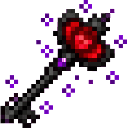
Determination Soul
Hold the Determination Soul and use it. Each use increases your Soul energy by 1, up to a maximum of 7/7.
Using the Soul also grants:
- Brief regeneration
- Brief resistance
The Soul remains in your inventory after use. You can continue using it at maximum energy to receive its temporary effects, but your energy cannot exceed 7.
Bone Blade
Equip the Bone Blade in your main hand and attack entities normally.
- Listed weapon damage: 5
- Additional damage on a successful hit: 2
- Grants the attacker a short Speed effect after hitting
- Durability: 180
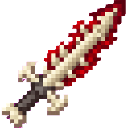
Craft it at a crafting table:


Crafting And Obtaining
Determination Soul
The starter kit includes a Determination Soul. Additional Souls can be crafted at a crafting table using a Nether Star and Redstone:


Soulfall Key
The Soulfall Key uses Gold, Iron, and Redstone:
Bone Blade
The Bone Blade uses a Bone, Bone Block, and Stick:
Soul-Themed Blocks
The Soulfall blocks can be used as decorative and building materials. Their block items can be obtained from Creative inventory or recovered by mining placed examples.
| Block | Recommended tool | Notes |
|---|---|---|
| Soulstone | Pickaxe | Durable Soul-themed construction block |
| Soulgrass | Shovel | Grass-like decorative terrain block |
| Soulwood | Axe | Wood-themed construction block |
| Soulleaves | No special tool required | Transparent decorative foliage |
| Soulflower | No special tool required | Small decorative plant |
Soulflower, Soulgrass, Soulleaves, Soulstone, and Soulwood each drop their corresponding block item when broken.
Abilities And Mechanics
Soul Energy
Soul energy begins at 0/7.
You can gain energy in two ways:
- Use the Determination Soul.
- Defeat Soul Wisps yourself.
Every third Soul Wisp defeated by a player grants 1 Soul energy, provided the player has less than 7 energy. The Soul Wisp defeat counter continues increasing even after energy reaches its maximum.
The action bar displays information in this format:
- Current Soul energy
- Total Soul Wisps defeated
Soul Wisp
Soul Wisps are hostile monsters with the following traits:
- 20 health
- 3 attack damage
- Spawn in groups of 2–4
- Appear in dark areas with light level 7 or below
- Can spawn on the surface or underground
- Appear in monster biomes on Easy, Normal, and Hard difficulty
- Burn in daylight
- Can climb and navigate through water
- Can break doors
- May pick up and use suitable equipment
Defeating a Soul Wisp directly grants the player 1 Glowstone Dust through Soulfall’s progression system. Soul Wisps also commonly drop Rotten Flesh, with a small chance of dropping an Iron Ingot, Carrot, or Potato.
Soul Wisps can be spawned from Creative inventory using the Soul Wisp Spawn Egg. They can also be summoned with:
/summon com_naoyacharalavinho_fd6yi2ak:soul_wisp
Progression And Strategy
- Use the starter house as a base. Place it in a safe, open location before beginning longer expeditions.
- Keep the Determination Soul available. Its regeneration and resistance effects are useful before entering dangerous areas.
- Use the Bone Blade for early combat. Its bonus damage and speed effect make it effective against common hostile mobs.
- Hunt Soul Wisps in darkness. Look underground or travel at night, and bring food and equipment for groups of several enemies.
- Track groups of three. Every third player defeat gives a chance to increase Soul energy, up to 7/7.
- Save Glowstone Dust. Soul Wisps provide a steady source while you explore and build your Soulfall supplies.
- Use the Soul blocks in your base. Soulstone, Soulwood, Soulgrass, Soulleaves, and Soulflower provide a consistent theme for houses, pathways, gardens, and ritual areas.
How to install
Download the mod and follow the step-by-step installation guide.
This mod is licensed under the CreativeMode Mods License.