


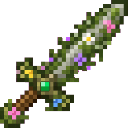
Description
Grow vibrant moss and flowers wherever your sword strikes.
Mod Wiki
Mossbloom Sword
Quickstart
- Gather a flowering azalea, moss block, and stick.
- Craft the sword at a crafting table:
- Equip the Mossbloom Sword in your hand.
- Strike any entity. After the hit, moss, moss carpet, and a random selection of plants will appear around the entity’s position.
- Try fighting several mobs in an open area to create a larger garden. Existing non-air blocks are preserved, so the sword will not replace terrain or structures.
In Creative mode, you can also obtain it with:
/give @s com_mossbloom_sword_b7ecf3x3:my_sword
Overview
The Mossbloom Sword is a combat weapon that transforms the area around anything it hits. Every successful hit creates a small mossy patch and may grow flowers and other plants around the target.
It works in any dimension where the target can be hit and uses the target’s position as the center of the bloom.
What It Adds
- Mossbloom Sword
- Attack damage: 6
- Maximum durability: 500
- Sword enchantment support
- Repairs with moss and azalea-related materials
- Moss carpet and moss blocks generated around struck entities
- Random plant blooms, including:
- Short grass
- Ferns
- Azalea
- Flowering azalea
- Dandelions
- Poppies
- Blue orchids
- Alliums
- Cornflowers
- Oxeye daisies
- Lilies of the valley
- Wither roses
How To Use
Hold the Mossbloom Sword and attack an entity normally. The blooming effect activates when the sword hits an entity; simply swinging at empty air or striking a block does not activate it.
The effect is centered on the entity’s position when the bloom occurs:
- Moss carpet spreads across a small 3×3 area at the entity’s feet.
- Moss blocks form a 3×3 patch beneath the target, with additional moss extending outward in a cross pattern.
- Plants can appear around the moss patch in a varied arrangement.
- Each possible plant has an independent chance to appear, so every hit can produce a different bloom.
- Generated blocks and plants replace air only. They do not overwrite existing terrain, buildings, or other blocks.
- Existing blooms remain until mined or removed normally.
Crafting And Obtaining
Craft the Mossbloom Sword at a crafting table using one flowering azalea, one moss block, and one stick.
In Creative mode, find it in the Equipment category or use:
/give @s com_mossbloom_sword_b7ecf3x3:my_sword
The sword can be repaired using:
- Moss blocks
- Azaleas
- Flowering azaleas
Each accepted repair material provides 100 durability points.
Abilities And Mechanics
Moss Growth
A successful entity hit creates moss around the target’s feet. The moss pattern covers the nearby ground without replacing blocks that are already present.
The effect is especially visible when fighting mobs across open ground, where the moss carpet and plants have room to spread.
Random Blooms
The sword checks each possible bloom location separately. Some hits may produce only a few plants, while others may create a fuller mixture of grasses, flowers, azaleas, and even wither roses.
Plants also replace air only. If a location is occupied, that particular plant does not appear.
Combat Properties
The Mossbloom Sword deals 6 attack damage, has 500 maximum durability, and can receive sword enchantments. Continue using it as a normal melee weapon while turning battlefields, paths, or arenas into flowering landscapes.
Progression And Strategy
- Carry the sword while exploring to leave a trail of moss and flowers as you fight.
- Fight mobs on open terrain for the clearest and largest visible blooms.
- Use repeated hits in the same area to build up a denser garden; existing moss and plants are not overwritten by later blooms.
- Avoid fighting directly beside important builds if you want to keep the area tidy, even though the effect only fills air.
- Keep moss blocks, azaleas, or flowering azaleas available so the sword can be repaired when needed.
- The possible wither rose makes the sword useful for creating dramatic or dangerous garden designs, but place those blooms carefully.
How to install
Download the mod and follow the step-by-step installation guide.
This mod is licensed under the CreativeMode Mods License.