


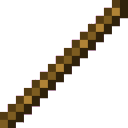
Description
The Minecraft Mod item is a simple stick-like tool that can be found in the Tools creative tab. It stacks up to 64 and can be carried in your inventory like any standard item.
Mod Wiki
Minecraft Mod
Quickstart
- Open your crafting table — the recipe is automatically unlocked when you join a world.
- Craft the Minecraft Mod item using two sticks stacked vertically:
- Pick it up and add it to your inventory. That's it — you're ready to go!
Overview
The Minecraft Mod adds a single craftable item simply called Minecraft Mod. It is a stick-like tool that sits in the Tools creative tab alongside other utility items. Lightweight and stackable, it fits naturally into any inventory without taking up extra space.
What It Adds
| Item | Stack Size | Creative Tab |
|---|---|---|
| Minecraft Mod | 64 | Tools |
The item belongs to the wooden rod and stick family, meaning it can be used anywhere a standard stick or wooden rod is accepted — including as a crafting ingredient in vanilla and modded recipes that call for those materials.
How To Use
- Carry it in your inventory or hotbar like any normal item.
- Use it as a crafting substitute wherever sticks or wooden rods are required, thanks to its item tags.
- Find it in Creative Mode under the Tools tab if you don't want to craft it.
Crafting And Obtaining
The recipe is automatically unlocked for every player the moment they join the world, so it will appear in your recipe book right away. Craft it at any crafting table using the recipe shown above.
How to install
This Java mod can be used on Windows and Mac PCs with the CreativeMode Launcher or any Minecraft launcher of your choice.

1. Download and install the new CreativeMode Launcher

2. Click to play on the top of the screen.
3. That's it — launches instantly. No complicated setup required.
Want to use on a different launcher? Download mod and manually install.
This mod is licensed under the CreativeMode Mods License.