

Description
Create directional water currents that push you and nearby creatures through the water.
Mod Wiki
Living Currents
Quickstart
- Craft a Current Gauge at a crafting table:


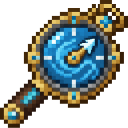
- Hold the gauge and use it on a water block to set a current flowing in the direction you’re facing. Try swimming through the area to feel the push.
- Use the gauge again on that same water block to remove its current zone. Use the gauge in the air to open settings.
Overview
Living Currents creates gentle water drift that affects you and nearby immersed creatures, boats, and loose items. Drift responds to the surrounding water, and Current Gauge zones let you choose a direction for a stronger, localized flow.
What It Adds
- Current Gauge: A single-item tool for setting or removing current zones and adjusting flow settings.
- Directional flow zones: Each zone points horizontally in the direction you’re facing when you place it.
- Water drift: Immersed players and nearby immersed entities can be carried along by water movement.
How To Use
Use the Current Gauge on a water block to place a zone. Aim horizontally toward the direction you want the current to flow. The gauge confirms when a zone is set or removed.
Use the gauge on the same water block again to remove its zone. A world can have up to 40 zones.
Use the gauge without targeting a block of water to open the settings form. Select your preferences and choose Apply to save them.
Crafting And Obtaining
Craft the Current Gauge at a crafting table using the recipe in Quickstart. The gauge has a maximum stack size of one.
Abilities And Mechanics
- Flow zones affect immersed entities within roughly 7 blocks of the zone; their influence fades with distance.
- Natural drift responds to differences in water level and depth. Surface drift adds gentle wave-like movement near the water’s surface.
- Flow force can be adjusted from 0.25× to 1.75×. You can also disable current effects, toggle surface drift, and choose a simulation rate: Slow · 1 s, Balanced · 0.5 s, or Responsive · 0.25 s.
Progression And Strategy
Start with one zone in a pool or channel and swim through it to test the direction. For a longer route, place zones along the waterway, checking each direction as you go. If a zone pushes the wrong way, use the gauge on its water block to remove it and place it again while facing the desired direction.
How to install
Download the mod and follow the step-by-step installation guide.
This mod is licensed under the CreativeMode Mods License.