Description
You can also obtain the items directly with commands:
/give @s landmine-5noeblof:remote_landmine/give @s landmine-5noeblof:remote_detonatorLandmine adds remotely controlled explosive mines and a handheld trigger. Mines do not activate when stepped on; only their owner's Remote Detonator can trigger them.
The Remote Detonator works from any distance and detonates all of your currently tracked Remote Landmines with one right-click.
| Item | Use |
|---|---|
| Remote Landmine | A thin ground-placed mine that waits for a remote detonation command |
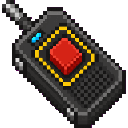
| Remote Detonator | A handheld trigger that detonates all Remote Landmines you placed |
Remote Landmines are listed in the Redstone creative category alongside the Remote Detonator.
Hold Remote Landmines and place them on suitable ground surfaces. Each mine records the player who placed it.
Mines:
Hold the Remote Detonator in either hand and right-click. It detonates every Remote Landmine you placed, regardless of how far away you are.
The detonator:
When mines are successfully triggered, the game displays the number detonated. If you have no placed mines, it reports that there are no remote landmines to detonate.
Only the player who placed a mine can detonate it with their Remote Detonator. Other players' mines are not included in your detonation.
Breaking a mine removes it from its owner's tracked mine list without causing an explosion.
Crafting a Remote Landmine produces two mines.


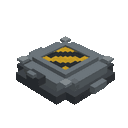
The recipe uses redstone, gunpowder, a stone pressure plate, and iron ingots.
The Remote Detonator is crafted from an iron ingot, redstone, a stone button, and a redstone torch.


The crafting recipe becomes available after you obtain the required redstone torch for the detonator, and the landmine recipe becomes available after you obtain redstone.
Because detonation affects every mine you placed, avoid deploying mines near areas you want to preserve. Separate your minefields by player ownership when several players are using the mod, since each detonator only controls its owner's mines.
This Java mod can be used on Windows and Mac PCs with the CreativeMode Launcher or any Minecraft launcher of your choice.

1. Download and install the new CreativeMode Launcher

2. Click to play on the top of the screen.
3. That's it — launches instantly. No complicated setup required.
Want to use on a different launcher? Download mod and manually install.
This mod is licensed under the CreativeMode Mods License.


