

Description
Kingdom Expansion turns clusters of five or more beds into full-fledged, defended settlements with stone-brick perimeter walls, gates, corner towers, spaced royal castles, specially seeded villagers, guarded throne rooms with persistent iron golems, and a one-time fanfare when a kingdom is founded, with wall generation that respects existing kingdoms and an infrastructure score that grows as settlements expand. Befriend villagers and royalty by holding any item and pressing G while looking at them to give gifts—friendship unlocks quests, rewards, and ledger-tracked statuses via the Kingdom Interaction Tool (which shows hostility, justice, grace, quest entries, and more); villagers will also place short-lived blocks to solve pathing, contributing to infrastructure, and a universal Player Anger Reset treats player death as “justice served,” clearing gossip, bounties, and hostility while granting a short respawn grace window. To keep interactions stable, any villager you open a UI with (trading, gifting, kingdom, quest, offering or other merchant screens) is completely frozen: all AI, navigation, brain/gossip/POI/profession/schedule/trade refresh and panic/attack/construct behaviors are paused so UIs no longer auto-close, and everything resumes normally when you close the screen; this freeze is compatible with guards, royalty, Bodhi guardians, kingdom villagers, special professions, and modded villager-like entities and custom UIs.
Mod Wiki
Kingdom Expansion
Quickstart
- Find or create a compact village with at least five claimed beds. Keep the homes within roughly 144 blocks of one another.
- Stay near the village while Kingdom Expansion scans it. Once founded, the settlement receives stone-brick walls, four gates, corner towers, special villagers, castles, royalty, and iron golem defenders.
- In Creative mode, use the Kingdom Expansion Tester near open village ground to seed the special villagers and kingdom structures immediately.
- Look at a villager or royal character, hold an item in your main hand, and press G. Flowers, books, food, emeralds, and precious materials are especially effective gifts.
- Continue gifting until your friendship rank improves. At 4 friendship with royalty, you can receive the Kingdom Interaction Tool.
- Use the tool while looking at a villager or right-click a villager with it to view friendship, quest progress, hostility, justice, and grace information.
- Open a villager’s trading or other interaction screen normally. The villager remains completely still until you close the screen.
Overview
Kingdom Expansion transforms groups of village homes into defended settlements. A founded kingdom develops around its beds and may include:
- Stone-brick perimeter walls with gates and corner towers
- Castles placed around the settlement
- Kings, queens, princes, and princesses
- Kingdom specialists with unique trades
- Persistent iron golem castle guards
- Friendship ranks, quests, royal favor, and kingdom status
- Knowledge stations for stories, laws, manuals, quests, cultures, and blueprints
- Temporary villager construction that helps solve pathing problems
- A one-time founding message and fanfare
Kingdom data, friendship, founded settlements, wall placements, and interaction records persist in the world.
What It Adds
Kingdom Villagers
Kingdom settlements seed persistent special villagers around the homes. The available roles are:
| Role | Main trade focus |
|---|---|
| Archaeologist | Brushes, maps, suspicious sand, name tags |
| Alchemist | Redstone, glowstone dust, blaze powder, brewing stands |
| Astronomer | Spyglasses, clocks, ender pearls, experience bottles |
| Occultist | Black candles, echo shards, ender eyes, totems of undying |
| Adventurer | Leather boots, bows, cooked beef, iron swords |
| Guild Member | Books, leads, bells, and metal exchange |
| Guild Master | Emeralds, anvils, enchanted books, netherite upgrade templates |
| King | Golden apples, maces, and heavy cores |
| Queen | Experience bottles, enchanted golden apples, and elytra |
| Prince | Shields, golden carrots, and diamond horse armor |
| Princess | Cakes, amethyst blocks, and hearts of the sea |
Royal Castles
A kingdom attempts to place several spaced castles around the settlement. The royal court consists of:
- One ruling King or Queen
- One Prince
- One Princess
Royal characters remain in castle throne rooms. Persistent iron golems stand guard inside the castles.
Castle placement requires reasonably level ground and avoids village points of interest. If a suitable site cannot be found, that part of the royal court may not appear.
Settlement Defenses
A normal kingdom wall is a large stone-brick square with:
- Four gated entrances
- Four corner towers
- Lanterns and torches along the defenses
Walls respect existing kingdoms. A wall may shrink to avoid an older kingdom, or be skipped entirely when settlements are too close together.
How To Use
Founding a Kingdom
A kingdom is founded when the mod detects a compact group of at least five village homes. The scan works while players are near the settlement.
When the kingdom is founded:
- Special villagers are seeded around the settlement.
- A wall and gates are generated when safe to do so.
- Castles and royalty are placed at suitable locations.
- Iron golem guards are created at the castles.
- All players receive a founding message with the kingdom’s coordinates.
- A founding fanfare plays once.
A settlement’s infrastructure score grows as its buildings, defenses, and pathing-support activity expand.
Gifting Villagers and Royalty
To give a gift:
- Hold the item in your main hand.
- Look directly at a villager or royal character within reach.
- Press G.
The gift is consumed outside Creative mode. The Kingdom Interaction Tool and Kingdom Expansion Tester cannot be gifted.
Gift values are generally:
| Gift | Friendship value |
|---|---|
| Diamond, emerald, gold ingot, gold block, or amethyst shard | 10 |
| Poppy, dandelion, blue orchid, allium, oxeye daisy, book, or cake | 5 |
| Food items | 4 |
| Other acceptable items | 3 |
Royalty grants 2 additional friendship for each gift. Precious materials are therefore especially useful when building royal favor.
Friendship Ranks and Quests
Friendship is tracked as a kingdom relationship from 0 to 100.
| Friendship | Rank | Guidance |
|---|---|---|
| 0–14 | New Visitor | Give thoughtful gifts to become known |
| 15–34 | Known Helper | Food, books, flowers, emeralds, and royal treasures improve your standing |
| 35–59 | Trusted Friend | Continue supporting citizens; royalty recognizes trusted visitors |
| 60–100 | Royal Ally | You are recognized as an ally of the settlement or crown |
The Kingdom Interaction Tool displays the current rank and the next quest message. Royal characters use royal quest text once you reach the trusted and ally ranks.
Using the Kingdom Interaction Tool
Use the tool in either of these ways:
- Hold it and use it while looking at a villager.
- Right-click a villager while holding it.
The tool reports:
- The target’s recognition of you
- Kingdom friendship and rank
- Current villager or royal quest
- Village hostility
- Faction anger
- Kingdom hostility
- Whether karma aggression was reset
- Whether justice was served
- Remaining respawn grace time
Vanilla villagers can also report village-level relationship information through the tool.
Crafting And Obtaining
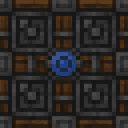
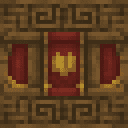
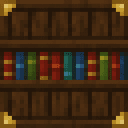
The Village Library, Lectern of Stories, and Council Archive are craftable knowledge stations.
Council Archive


Lectern of Stories


Village Library

The Kingdom Expansion Tester and Kingdom Interaction Tool are available in the Creative tools inventory. The Interaction Tool can also be earned from royalty after reaching at least 4 friendship, provided you do not already have one.
Knowledge Books
Knowledge stations respond to regular books, writable books, and written books. Hold a book in your main hand and use it on a knowledge station. You can also use a book directly on a kingdom villager, or place a book in a nearby regular lectern.
Book text is read for recognizable type words and tags. The type names are:
STORYLAWMANUALQUESTCULTUREBLUEPRINT
A book with the same contents is processed only once for a particular village. Use different chapter or book text when continuing a story or project.
Abilities And Mechanics
Stories
A book containing STORY begins a story event. Include a chapter heading such as CHAPTER ONE or CHAPTER THE OLD ROAD.
Nearby villagers gather, and the player receives a direction toward another village where the story can continue.
Laws
A book containing LAW updates the settlement’s law knowledge. Useful law tags include:
TAXCURFEWFESTIVALDIPLOMACY
The Council Archive reports how many nearby council members were involved and displays the settlement’s leader approval.
Manuals
A book containing MANUAL teaches a settlement about practical skills. Add one or more of these tags:
FARMINGMASONRYTRADE
Villagers receive the knowledge, and existing workers improve as they practice.
Quests
A book containing QUEST assigns a travel quest to the player. By default, the quest leads to a neighboring village. Add the BIOME tag to direct the quest toward a marked biome instead.
Culture
A book containing CULTURE can introduce traditions using:
FESTIVALGREETINGCLOTHINGARCHITECTURE
Color tags such as RED, BLUE, GOLD, and GREEN can influence clothing when CLOTHING is included. Culture may change greetings, festivals, clothing colors, and building style.
Blueprints
A book containing BLUEPRINT starts a construction project. Available project tags include:
BRIDGEHOUSEMARKETWALL
If no project tag is supplied, the settlement begins a house project. Villagers begin working on the project, and the initial blueprint can place a few starter blocks.
Villager Construction
Villagers can help themselves when they are physically stuck. A villager may place a temporary block to escape:
- A deep hole
- Water or a swimming obstruction
- A failed or blocked path
- Another physical pathing problem
These blocks are short-lived and are normally removed after roughly 5–10 minutes. Construction is limited so that ordinary idling or socializing does not constantly alter the settlement.
Villager construction contributes to the kingdom’s infrastructure progress.
Interaction Freeze
When you open a villager interaction screen, the villager is frozen in place. This includes trading and other kingdom, quest, gifting, offering, and merchant-style screens.
While the screen is open, the villager does not:
- Walk or navigate
- Run normal artificial intelligence
- Panic or attack
- Refresh trades
- Change profession or schedule behavior
- Update brain, gossip, or point-of-interest activity
- Perform construction behavior
Close the screen to restore the villager’s normal behavior. This also keeps royal throne-room interactions, guards, and kingdom villager screens from closing because the target wandered away.
Justice, Anger, and Respawn Grace
Player death counts as justice served. After you respawn, the anger reset can clear:
- Village hostility
- Villager gossip directed against you
- Faction anger
- Kingdom enemy status
- Bounties and related hostility
- Bodhi karma aggression
A short justice grace period lasts about 20 seconds. During this time, villagers, guards, royalty, and Bodhi guardians cannot immediately re-aggro toward you.
Use the Kingdom Interaction Tool after respawning to inspect the ledger and confirm which hostility states were cleared and how much grace remains.
Progression And Strategy
- Begin with flowers, books, cake, or food to reach Known Helper without spending rare materials.
- Give emeralds, diamonds, gold, or amethyst to royalty when you want friendship to rise quickly.
- Reach at least 4 friendship with a royal character to earn the Kingdom Interaction Tool.
- Reach 15 friendship before relying on villager quest progression.
- Reach 35 friendship to become a Trusted Friend and unlock stronger royal standing.
- Reach 60 friendship to become a Royal Ally.
- Keep beds grouped together if you want the settlement to be recognized as one kingdom.
- Leave open, level ground around the village so walls and castles have room to generate.
- Avoid founding settlements too close together; existing kingdom walls can force a smaller wall or prevent a new wall from appearing.
- Use the tester near open ground when experimenting with kingdom structures in Creative mode.
- Use knowledge books with clear type words and tags, then vary chapter or book text for subsequent events.
- Let villagers work near the settlement. Their pathing repairs and construction projects gradually support infrastructure growth.
How to install
This Java mod can be used on Windows and Mac PCs with the CreativeMode Launcher or any Minecraft launcher of your choice.

1. Download and install the new CreativeMode Launcher

2. Click to play on the top of the screen.
3. That's it — launches instantly. No complicated setup required.
Want to use on a different launcher? Download mod and manually install.
This mod is licensed under the CreativeMode Mods License.