


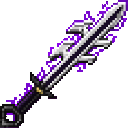
Description
The Inverted Spear of Heaven is a netherite-tier melee weapon that deals extremely high damage and strips all active status effects from any mob or player you hit. While holding the spear press R to open the expanded magic and upgrade GUI (the old magic wheel) to choose the active ability or use the Upgrade Tier button; left-click performs a normal melee attack and right-click casts the currently selected ability, which is saved on the spear. The spear now grows from Tier 1 to Tier 5 using rare materials in the GUI—Tier 2: Diamond + Amethyst Shards, Tier 3: Netherite Ingot + Echo Shards, Tier 4: Dragon Breath + Totem of Undying, Tier 5: Nether Star + End Crystal—each tier unlocks more powerful effects (Purify, Heal, Blink and Arcane Burst are available early, while Energy Slash, Energy Beam and the devastating Heaven Rift unlock at higher tiers); Creative players can upgrade without consuming items.
Mod Wiki
Inverted Spear Of Heaven
Quickstart
- Craft the spear using the recipe below and hold it in either hand.
- Left-click to melee attack — it deals netherite-tier damage and instantly strips all status effects from anything you hit.
- Press R to open the Magic & Upgrade GUI, pick an ability, then right-click to cast it.
- When you have the right materials, press R and click Upgrade Tier to grow the spear's power.
Overview
The Inverted Spear of Heaven is a powerful melee weapon with two layers of gameplay: a devastating basic attack that doubles as a status-effect purge, and a growing suite of magical abilities unlocked by upgrading the spear through five tiers. It sits in the Combat item group and is treated as a sword for enchantment purposes.
What It Adds
| Item | Description |
|---|---|
| Inverted Spear of Heaven | Netherite-tier melee weapon with ability casting and five upgrade tiers |
How To Use
Basic Attack
Hold the spear and left-click as you would any sword. The hit deals high damage and removes every active status effect from the target — useful against buffed bosses, potion-boosted players, or any mob with lingering effects.
Casting Abilities
Right-click casts whichever ability is currently selected on the spear. The selection is stored on the item itself, so it persists across sessions.
Magic & Upgrade GUI (R key)
While holding the spear, press R to open the Magic & Upgrade screen. Seven ability buttons are arranged around the screen; click one to make it the active ability. A separate Upgrade Tier button at the bottom of the screen triggers the tier upgrade (consuming the required materials from your inventory).
Abilities And Mechanics
The spear has seven abilities. Early tiers unlock the foundational set; higher tiers reveal increasingly destructive options.
| Ability | Availability |
|---|---|
| Purify | Early tiers |
| Heal | Early tiers |
| Blink | Early tiers |
| Arcane Burst | Early tiers |
| Energy Slash | Higher tiers |
| Energy Beam | Higher tiers |
| Heaven Rift | Highest tiers |
Select an ability in the GUI, then right-click to activate it. Your selection is saved, so you don't need to re-open the GUI before every cast.
Progression And Strategy
The spear grows from Tier 1 to Tier 5. Each upgrade is performed through the in-game GUI — open it with R, ensure the required items are in your inventory, then click Upgrade Tier.
| Tier | Required Materials |
|---|---|
| Tier 2 | Diamond + Amethyst Shards |
| Tier 3 | Netherite Ingot + Echo Shards |
| Tier 4 | Dragon Breath + Totem of Undying |
| Tier 5 | Nether Star + End Crystal |
Creative mode: The Upgrade Tier button works without consuming any items, letting you freely test all tiers and abilities.
Tips:
- Use the status-effect strip on bosses or players who have buffed themselves heavily before engaging with abilities.
- Prioritise reaching Tier 3 early — Netherite and Echo Shards are obtainable in a standard survival progression and unlock significantly stronger abilities.
- Heaven Rift is available at the highest tier and is described as devastating; save it for the most demanding encounters.
- Set your preferred ability before a fight so right-click is ready to fire instantly.
How to install
This Java mod can be used on Windows and Mac PCs with the CreativeMode Launcher or any Minecraft launcher of your choice.

1. Download and install the new CreativeMode Launcher

2. Click to play on the top of the screen.
3. That's it — launches instantly. No complicated setup required.
Want to use on a different launcher? Download mod and manually install.
This mod is licensed under the CreativeMode Mods License.