

Description
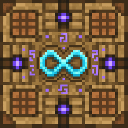
Infinite Crafting Table is a new craftable block that lets you produce any item or block without consuming materials, featuring a glowing enchanted crafting-table texture. Convert a vanilla crafting table into the Infinite Crafting Table using the included recipe, place it, and interact (right-click/tap) to open its UI; the block also drops itself when broken. The interface provides quick-craft presets for common items or lets you enter any valid item or block identifier and amount to instantly receive the requested items.
Mod Wiki
Infinite Crafting Table
Quickstart
- Craft the Infinite Crafting Table by placing a vanilla Crafting Table in any crafting grid:


- Place the Infinite Crafting Table anywhere in your world.
- Right-click or tap the block to open its menu.
- Choose a quick-craft category (e.g. Valuables, Tools & Combat) to instantly receive preset items, or select Custom Item ID to request any item by name and quantity.
- Items are delivered directly to your inventory — no materials consumed.
Overview
The Infinite Crafting Table is a single craftable block that lets you obtain any item or block in the game without spending resources. It replaces the standard Crafting Table workflow with an on-demand UI that hands items straight to you. The block has a glowing enchanted crafting-table appearance, takes about 2.5 seconds to mine with an axe, and always drops itself when broken so you never lose it.
What It Adds
| Addition | Description |
|---|---|
| Infinite Crafting Table (block) | Placeable block with a glowing enchanted texture. Opens an item-granting UI on interaction. Drops itself when broken. |
How To Use
Opening the Menu
Right-click the block (or tap on touch/controller) to open the Infinite Crafting Table main menu. The menu has two ways to get items:
- Quick Craft categories — pre-built lists of common items, ready to grab in one tap.
- Custom Item ID — a free-form form where you type any valid Minecraft item identifier and choose a quantity with a slider.
Quick Craft Categories
| Category | Example Presets |
|---|---|
| Valuables | Diamond ×64, Emerald ×64, Iron Ingots ×64, Gold Ingots ×64, Netherite Ingots ×16, Experience Bottles ×64 |
| Tools & Combat | Diamond Pickaxe ×1, Diamond Sword ×1, and more |
Select a category, then tap any entry. The items are added to your inventory immediately and a confirmation message appears in chat.
Custom Item ID
Select Custom Item ID from the main menu to open a small form with:
- Item or block id — type a Minecraft identifier such as
minecraft:diamondor justdiamond. If the ID is invalid, you will see an error message in chat. - Amount — use the slider to pick how many you want (minimum 1, up to the maximum allowed).
Hit Submit and the items are granted instantly.
Crafting And Obtaining
The Infinite Crafting Table is crafted from a single vanilla Crafting Table — no special arrangement required:
Place the resulting block wherever is convenient. If you ever break it, it always drops itself, so you can pick it up and relocate it freely.
Abilities And Mechanics
- No material cost — items are granted via a give command; nothing in your inventory is removed.
- Any valid item — the Custom Item ID mode accepts any Minecraft item or block identifier recognised by the game, including blocks, equipment, and consumables.
- Input validation — if you enter an unrecognised item ID, the table reports an error in chat rather than silently failing.
- Mining — takes ~2.5 seconds to break; best broken with an axe. Has moderate explosion resistance.
- Always drops itself — no matter how it is broken, the block returns to your inventory as an item.
Progression And Strategy
Because the Infinite Crafting Table removes all resource costs, it is best suited for creative-style worlds, building servers, or testing scenarios where gathering materials would slow you down. A few tips:
- Keep it safe — the block survives explosions reasonably well, but keeping a spare in a chest means you are never without it.
- Use Custom Item ID for niche items — the quick-craft presets cover common needs, but the custom form lets you grab anything from rare blocks to hard-to-find consumables by typing their identifier.
- Combine with normal play — nothing stops you from placing the table in a survival world to skip tedious farming while still enjoying the rest of the game normally.
How to install
Download the mod and follow the step-by-step installation guide.
This mod is licensed under the CreativeMode Mods License.