

Description
Summon Goku, train with him, and unlock powerful boosts for your next adventure.
Mod Wiki
Goku Training Call
Quickstart
- Craft a Goku Training Call using the recipe below.
- Hold it and use it (right-click) in a clear area. Goku appears a short distance in front of you.
- Move within 4 blocks of Goku to start training automatically. Stay nearby for the 30-second session and watch for his messages.
The call has a 30-second cooldown and is not consumed when used.
Overview
Goku is a friendly training companion. Getting close to him grants combat and movement boosts; no separate interaction is needed to begin training.
What It Adds
- Goku Training Call: A reusable item that summons Goku.
- Goku: A named, invulnerable visitor who starts a training session when a player comes close.
How To Use
Use the call while facing the spot where you want Goku to appear. Once he is summoned, approach within 4 blocks to begin. Each summoned Goku can train each player once; summoning another Goku allows another session.
Crafting And Obtaining
The crafting recipe becomes available after you enter a world. Make the call in a crafting table:


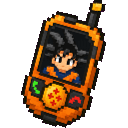
Abilities And Mechanics
Training grants these effects:
| When | Effects |
|---|---|
| Training begins | Strength II, Resistance I, and Speed I for 10 minutes |
| 5 seconds into training | Speed II and Jump Boost II for 10 minutes |
| After 30 seconds | Goku announces that training is complete |
The training continues after it begins, even if you move away from Goku.
Progression And Strategy
Use the movement boosts to practice running and jumping, then take the combat boosts into your next adventure. The call’s cooldown is shorter than the effects’ duration, so you can summon Goku again for another session once it is ready.
How to install
This Java mod can be used on Windows and Mac PCs with the CreativeMode Launcher or any Minecraft launcher of your choice.

1. Download and install the new CreativeMode Launcher
2. Click to play on the top of the screen.
3. That's it — launches instantly. No complicated setup required.
Want to use on a different launcher? Download mod and manually install.
Ported from
Goku Training Call
angelocraft19
Java 26.1
This mod is licensed under the CreativeMode Mods License.