

Description
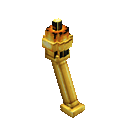
Build a Gilded Torch that flickers with golden sparks and chimes at your touch.
Mod Wiki
Gilded Torch
Quickstart
- Craft the Gilded Torch with eight gold nuggets and one torch. Its recipe is unlocked when you enter a world.
- Place it where there’s room for its other sections; clear nearby blocks first so the whole torch can assemble.
- With an empty hand, right-click any part of the torch to make it sparkle and chime.
Overview
The Gilded Torch is a decorative, multi-part block. Once placed, it flickers with particle effects. Touching it with an empty hand triggers a burst of sparks and a chime.
What It Adds
- Gilded Torch: A placeable torch assembly that emits occasional particles and responds to a touch.
How To Use
Place the Gilded Torch like a block. The other sections appear automatically where there is room, so leave space around the placement spot. The torch faces the direction set by your placement.
Right-click any section with an empty hand for a chime and a burst of particles. Holding an item prevents this interaction. Breaking a section removes the rest of the assembly as well.
Crafting And Obtaining
Craft the torch in a crafting table:


How to install
This Java mod can be used on Windows and Mac PCs with the CreativeMode Launcher or any Minecraft launcher of your choice.

1. Download and install the new CreativeMode Launcher

2. Click to play on the top of the screen.
3. That's it — launches instantly. No complicated setup required.
Want to use on a different launcher? Download mod and manually install.
This mod is licensed under the CreativeMode Mods License.