

Description
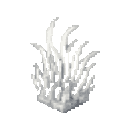
The Ghastgrass Bloom is a pale, ghostly block that emits a 5‑block growth aura to greatly accelerate nearby crops, saplings, and plants; place it and right‑click it to draw a short burst of Saturation and mild disorientation on a short cooldown, and it continuously emits ghostly particles while active — breaking it yields Ghastgrass strands usable for crafting, cooking, composting, or held and right‑clicked to eat as a light emergency snack. New in this version, Blooms self‑replicate during their aura pulse, placing up to two new Bloom copies on the farthest valid ground within their 5‑block reach (each clone schedules its own pulses), so place Blooms where you want a colony to expand and they will steadily spread outward, with random ticks keeping older or reloaded Blooms active to maintain propagation.
Mod Wiki
Ghastgrass Bloom
Quickstart
- Obtain a Ghastgrass Bloom in Creative mode, or craft one from a Dead Bush, Nether Wart, and Ghast Tear:


- Place the Bloom beside a crop field, sapling nursery, or other plants. Its 5-block growth aura greatly accelerates nearby crops, saplings, and plants.
- Right-click the placed Bloom to receive a short burst of Saturation along with mild disorientation. This ability has a short cooldown.
- Watch for ghostly particles around an active Bloom. During its aura pulses, it can place up to two new Blooms on the farthest valid ground within its reach, allowing a colony to spread outward.
- Break a Bloom to collect Ghastgrass. Hold Ghastgrass and right-click to eat it as an emergency snack.
Overview
The Ghastgrass Bloom is a pale, ghostly block that supports nearby plant growth and gradually spreads when placed in a suitable area. A single Bloom affects plants within 5 blocks and can eventually establish a larger colony as new Blooms replicate.
Blooms continuously emit ghostly particles while active, making their aura easy to spot.
What It Adds
- Ghastgrass Bloom — A placeable growth-aura block.
- Ghastgrass — A strand dropped when a Bloom is broken.
- A Saturation burst activated by right-clicking a placed Bloom.
- Self-replicating Bloom colonies.
- Crafting uses for Ghastgrass.
How To Use
Placing a Bloom
Place the Ghastgrass Bloom near the plants you want to accelerate. Crops, saplings, and other plants within 5 blocks benefit from its growth aura.
For colony expansion, leave open valid ground around the Bloom. During its aura pulses, the Bloom can place up to two copies on the farthest suitable ground within its 5-block reach. Each copy becomes an independent Bloom and schedules its own pulses.
Using the Saturation burst
Right-click a placed Bloom to draw a brief burst of Saturation. The effect also causes mild disorientation, so use it carefully when working near cliffs, lava, or other hazards. The Bloom needs a short time before it can be activated again.
Collecting Ghastgrass
Break a Ghastgrass Bloom to obtain Ghastgrass. Ghastgrass can be:
- Eaten directly as a light emergency snack.
- Crafted into string.
- Used to make mushroom stew.
- Added to a composter.
Ghastgrass restores a small amount of hunger and can be eaten even when you are not currently hungry.
Crafting And Obtaining
Crafting a Ghastgrass Bloom
The Bloom recipe uses:
- 1 Dead Bush
- 1 Nether Wart
- 1 Ghast Tear


Crafting with Ghastgrass
Turn Ghastgrass into two pieces of string:

Use Ghastgrass, a bowl, and a red mushroom to make mushroom stew:
Ghastgrass is also accepted by composters.
Abilities And Mechanics
Growth aura
Each Bloom has a 5-block reach and greatly accelerates nearby crops, saplings, and plants. Place Blooms throughout a farm or growing area to cover more ground.
Self-replication
A Bloom can reproduce during its aura pulses:
- It can place up to two new Bloom copies per pulse.
- Copies are placed on the farthest valid ground within the original Bloom’s 5-block reach.
- Every copy schedules its own pulses, allowing the colony to expand outward.
- Open ground is important; blocked or unsuitable locations cannot receive a new Bloom.
- Random ticks help older or reloaded Blooms remain active and continue propagating.
Saturation and disorientation
Right-clicking a Bloom grants a short Saturation burst and mild disorientation. This interaction has a short cooldown, so it cannot be triggered continuously.
Ghastly particles
Active Blooms continuously emit ghostly particles. Use the particles to locate Blooms and see where a growing colony is established.
Progression And Strategy
- Start with one Bloom beside a compact farm or sapling area.
- Leave open ground around it so its farthest valid placement locations are available.
- Position Blooms near the edge of an area you want a colony to reach; new copies can steadily spread outward.
- Use multiple starting Blooms when you need faster coverage over a large farm.
- Keep Ghastgrass for emergency food, string, stew, or composting rather than treating every Bloom drop as waste.
- Avoid relying on the Saturation burst in dangerous terrain because its accompanying disorientation can make movement hazardous.
How to install
This Java mod can be used on Windows and Mac PCs with the CreativeMode Launcher or any Minecraft launcher of your choice.

1. Download and install the new CreativeMode Launcher

2. Click to play on the top of the screen.
3. That's it — launches instantly. No complicated setup required.
Want to use on a different launcher? Download mod and manually install.
Players also liked
Diamond Repair Kit


The Diamond Repair Kit is a leather-bound tool roll containing a diamond hammer and chisel that instantly restores the durability of your tools. Right-click to repair the tool in your offhand first (or the next damaged item in your inventory), complete with an anvil sound and con…

The catalyst Jar


Hey, you! Do you hate making a bunch of potions for you or your friends? Hate wasting the bottles to shatter against mobs? Behold the catalyst jar! The catalyst Jar stores a drinkable potion and, when activated, creates a 5‑block radius cloud that follows you and reapplies the p…
Dicebound Sixfold Armament


The Dicebound Sixfold Armament is a magical multi-tool weapon that can transform between six different modes: Sword, Shovel, Pickaxe, Axe, Mace, and Healer. To change modes, hold Shift and right-click to roll a dice that randomly selects your next mode, complete with enchantment…

Tidebound Net


The Fishing Net is a 2x2x2 multiblock structure that automatically catches fish when placed near water. Every 5 seconds, it has a 40% chance to reel in a Cod, Salmon, Tropical Fish, or Pufferfish, complete with splash particles and sounds. Right-clicking any part of the net displ…


This mod is licensed under the CreativeMode Mods License.