


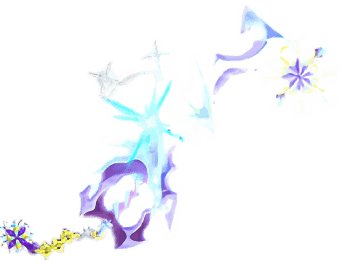
Description
Wield the Frostbound Trinity, summon three spinning blades from every angle, then dismiss them with a crouching right-click.
Mod Wiki
Frostbound Trinity
Quickstart
- Obtain the Frostbound Trinity by crafting it, using the Combat tab in Creative mode, or running:
/give @s frostbound-trinity-xfp5ag42:frostbound_trinity_xfp5ag42 - Hold it in either hand.
- Right-click to summon three floating Frostbound blades around you.
- Approach hostile mobs or wait for them to come within range. The blades automatically attack nearby targets.
- Sneak or crouch, then right-click with the Frostbound Trinity to dismiss the blades.
The normal summon action has a brief 1-second cooldown. Crouching right-click dismisses the blades immediately, even during this cooldown.
Overview
The Frostbound Trinity is a shimmering sword that combines ordinary melee combat with three owner-bound spectral blades. After being summoned, the blades follow your formation and attack hostile mobs automatically.
Only one set of three blades can be active for you at a time. Right-clicking normally while they are already active replaces the current formation with a new one.
What It Adds
- The Frostbound Trinity, a sword that can be used for melee combat.
- Three floating copies that defend their wielder.
- Automatic targeting of nearby hostile mobs.
- Frost-themed attacks with snowflake and end-rod effects.
- Slowness and continuing freeze damage on struck targets.
- A glowing item appearance.
How To Use
Summoning the Blades
Hold the Frostbound Trinity and use the normal right-click action. Three blades appear behind and around you, adjusting their formation as you move and look around.
The blades remain active until you dismiss them, die, or the summoned formation is otherwise broken.
Automatic Attacks
The blades search for the nearest living hostile mob within approximately 12 blocks of you. When a target is found:
- One blade moves forward from the formation.
- It aims at the target.
- It fires a frost attack.
- It returns to the formation.
- The next blade takes its turn.
The attack can target hostile mobs around you rather than only mobs directly in front of you.
Dismissing the Blades
Sneak or crouch while using the Frostbound Trinity. This dismisses all three summoned blades. The dismiss action works even if the normal summon cooldown is active.
Crafting And Obtaining
The recipe is unlocked when you enter a world. Craft the Frostbound Trinity with prismarine shards, a diamond, packed ice, and a stick:
The item is also available in the Creative combat inventory. For commands, its item ID is frostbound-trinity-xfp5ag42:frostbound_trinity_xfp5ag42.
Abilities And Mechanics
Frost Attack
Each successful blade strike deals 4 points of freeze damage and applies Slowness II for 4 seconds.
The target also suffers continuing frostbite damage for approximately 6 seconds, taking 1 additional point of freeze damage about once per second.
Blade Formation
All three blades are linked to the player who summoned them. They follow that player and attack one at a time rather than all striking simultaneously.
A summoned formation is removed when:
- You sneak and right-click with the Frostbound Trinity.
- The owner dies.
- The formation is no longer intact.
Melee Use
The Frostbound Trinity remains a sword while the blades are active or dismissed, so you can attack mobs directly with it as well as relying on its automatic frost attacks.
Progression And Strategy
- Summon the blades before entering combat so their attack cycle can begin while you position yourself.
- Stay near hostile mobs to keep them within the Trinity’s targeting range.
- Let the blades apply Slowness and frostbite before closing in for melee attacks.
- Use the crouching right-click to dismiss the blades when you want to stop attracting attention or prepare for a different encounter.
- Because the blades attack sequentially, use the sword yourself while waiting for the next spectral strike.
How to install
This Java mod can be used on Windows and Mac PCs with the CreativeMode Launcher or any Minecraft launcher of your choice.

1. Download and install the new CreativeMode Launcher

2. Click to play on the top of the screen.

3. That's it — launches instantly. No complicated setup required.
Want to use on a different launcher? Download mod and manually install.
This mod is licensed under the CreativeMode Mods License.