

Description
Create a Minecraft Bedrock addon that adds a fully functional Forest Ranger Computer. Computer Features: When the player double-clicks the computer, its interface opens. The computer has five applications. 1. Celerent - Shows the current weather. - Reports whether the wind is strong or calm. - Provides weather information and updates. 2. Bwer - Allows communication with other forest watchtowers. - For example, if Watchtower 12 receives a message saying "Hello", it replies in the chat: "[Watchtower 12]: Hello! Any news?" - The player can communicate with Watchtowers 11, 6, 5, 4, and 3. - Each watchtower should have its own identity and chat messages. 3. Camera - Allows the player to check security cameras. - The player must place cameras around the forest before using this application. - The computer displays the camera feeds. 4. [Create a fourth application] - Add another useful forest ranger application. 5. [Create a fifth application] - Add another useful forest ranger application. Additional Items and Features: - Add placeable security cameras. - Add another special item for forest monitoring. - Add dangerous creatures that spawn at night. - Add several forest camps containing Villagers. - Add a hostile creature that looks like a Wither Skeleton's head and attacks and kills Villagers in the camps. - Make the creatures and camps work properly in survival mode. Important Requirements: - Minecraft Bedrock Edition. - Target version: 1.26.52.3. - Make all computer applications functional and interactive. - Add custom textures, sounds, and animations. - Provide a working ".mcaddon" file. - Make the addon compatible with Android devices.
Mod Wiki
Forestwatch Command Console
Quickstart
- Craft and place a Forest Ranger Computer in a suitable forest area. Its first successful placement establishes three nearby ranger camps, each with villagers.
- Interact with the computer twice quickly to open its five-app menu. Try Celerent to set the weather or Firewatch to scan for threats and fire.
- Craft and place Security Cameras around the forest. Face the direction you want each camera to watch as you place it. Use the computer’s Camera app—or interact with a placed camera—to choose a feed.
- Craft a Ranger Survey Kit and use it to open a Firewatch scan without returning to the computer.
Overview
Forestwatch is a ranger outpost and monitoring toolkit. The computer provides weather controls, tower radio, remote camera views, hazard reports, and personal field notes. Its camps give villagers a place to live—and give Forest Stalkers something to threaten.
What It Adds
- Forest Ranger Computer: A placeable block with five interactive applications.
- Security Camera: A placeable camera that registers for the feed menu.
- Ranger Survey Kit: A handheld shortcut to the Firewatch hazard monitor.
- Forest Stalker: A hostile skeleton-like creature that can appear in low light and attack players and camp villagers.
- Ranger camps: Three camps are established near the first successfully placed computer, with two villagers at each.
How To Use
Computer applications
Interact with the computer twice quickly, then select an app:
- Celerent — Weather: Shows the current Celerent reading and wind advisory. Choose clear weather, rain, or a thunderstorm; thunderstorms report Strong wind, while clear weather and rain report Calm. Select Refresh outlook to refresh the display.
- Bwer — Tower Radio: Compose a message to Watchtower 12, 11, 6, 5, 4, or 3. Messages appear in chat with the selected tower’s identity and reply. A message beginning with “Hello” gets the reply “Hello! Any news?” You can also listen to status reports from the network.
- Camera — Security Feeds: Choose a registered camera in the current dimension. The view switches to that camera for 15 seconds, then returns to you. You can also interact directly with a camera to open the feed menu. Breaking a camera removes it from the network.
- Firewatch — Forest Hazards: Scans for Forest Stalkers within 48 blocks, nearby fire blocks, registered feeds, and established camps. Select Refresh field scan to scan again.
- Field Notes — Ranger Survey Kit: Open and save a personal field note from the computer. Notes persist for each ranger.
Cameras
Place cameras while facing the direction you want them to look. The menu shows up to six feed slots for the current dimension; empty slots prompt you to place a camera. Use Restore player view to return from a feed early.
Survey Kit
Use the Ranger Survey Kit to open the Firewatch monitor directly. It provides the same hazard scan as the computer app.
Crafting And Obtaining
Craft these items at a crafting table:
Forest Ranger Computer


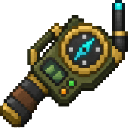
Security Camera

Ranger Survey Kit
Forest Stalkers can spawn naturally in low light, including underground, in many monster-spawning biomes. In Creative, you can also use a Forest Stalker Spawn Egg.
Abilities And Mechanics
Forest Stalkers are dangerous to players and camp residents. They can attack from range or at close quarters, so keep an eye on the Firewatch report and protect villagers when a stalker is nearby. Camps are built on suitable ground around the computer’s placement; their locations are included in the hazard report.
Progression And Strategy
Set up your first computer near the forest you want to patrol, then check the surrounding camps and place cameras along trails or near likely threats. Use Firewatch or the Survey Kit to check for stalkers and fire, and light camp areas to reduce the risk from low-light spawns. Use Bwer for patrol updates and Field Notes to keep track of sightings.
How to install
Download the mod and follow the step-by-step installation guide.
This mod is licensed under the CreativeMode Mods License.