


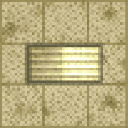
Description
The Flickerlight Backrooms is a placeable light block that recreates the unsettling atmosphere of flickering fluorescent lights. When placed, it glows at full brightness, but randomly flickers off and back on over time, creating a creepy backrooms-style ambiance. It is fragile and easy to break, making it a purely decorative lighting option best suited for atmospheric builds.
Mod Wiki
Flickerlight Backrooms
Quickstart
- Open your inventory and find Flickerlight Backrooms in the Functional Blocks creative tab, or craft one using the recipe below.
- Place it anywhere like a normal block — it lights up instantly at full brightness (light level 15).
- Step back and watch it randomly flicker off and back on, creating an eerie, unsettling ambiance.
Overview
Flickerlight Backrooms adds a single atmospheric light block designed to evoke the unsettling feeling of a decaying fluorescent tube — the kind found in liminal spaces and backrooms-style horror builds. It glows at maximum brightness when lit, but unpredictably flickers dark and snaps back on, making it perfect for horror maps, abandoned facilities, and creepy atmospheric builds.
What It Adds
| Block | Description |
|---|---|
| Flickerlight Backrooms | A fragile, flickering light block with a glass-like sound and a max brightness of 15 when lit. |
How To Use
- Place the block on any surface as you would any other block.
- Once placed, it will glow at full brightness (light level 15) and begin randomly flickering — toggling off and immediately snapping back on at unpredictable intervals.
- Breaking the block is quick and easy due to its low durability (similar to glass). It drops itself and can be picked up and replaced elsewhere.
- The block is purely decorative and provides no functional advantage beyond lighting and atmosphere.
Crafting And Obtaining
The recipe is unlocked automatically when you join a world. Craft it using a Soul Lantern at the centre, surrounded by Redstone, Glass, and Iron Ingots:
It also appears in the Functional Blocks creative tab for creative-mode builders.
Abilities And Mechanics
- Full brightness: When lit, the block emits light level 15, fully illuminating the surrounding area.
- Random flickering: On a random tick cycle, there is a 30% chance the block toggles off. When it turns off, it schedules itself to turn back on after a short delay, mimicking the brief dark flash of a failing fluorescent light.
- Fragile construction: The block has very low hardness (0.3), making it breakable in one or two hits without a tool — handle with care in survival mode.
- Glass sound: Breaking and placing the block produces glass-like sound effects, reinforcing its aesthetic.
Progression And Strategy
- Horror and liminal builds: Line corridors with Flickerlight Backrooms blocks for an instantly unsettling atmosphere. The irregular flicker timing means no two moments feel the same.
- Pairing with other blocks: Combine with pale or yellowish wool, smooth stone slabs, and carpet to build classic backrooms-style rooms.
- Survival caution: Because the block breaks easily, consider placing it last in a build to avoid accidental destruction. Craft a few spares before starting placement.
- Lighting gaps: During flicker-off moments the block emits no light, so avoid relying on it as your sole light source in survival areas where mob spawning is a concern. Pair with hidden, stable light sources if needed.
How to install
This Java mod can be used on Windows and Mac PCs with the CreativeMode Launcher or any Minecraft launcher of your choice.

1. Download and install the new CreativeMode Launcher

2. Click to play on the top of the screen.

3. That's it — launches instantly. No complicated setup required.
Want to use on a different launcher? Download mod and manually install.
This mod is licensed under the CreativeMode Mods License.