

Description
Power up the Deskbound Computer and bring your block-built workstation to life.
Mod Wiki
Deskbound Computer
Quickstart
- Craft the Deskbound Computer:


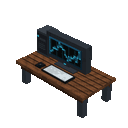
- Place it in an open area with enough room for the complete workstation. Placing the main block automatically assembles the surrounding computer parts.
- The computer faces toward you when placed. Right-click the computer—or any of its visible parts—to power it on.
- Look for the “Deskbound Computer online” message, end-rod particles, and a chime.
Overview
The Deskbound Computer is a placeable workstation-style computer model. It is assembled from multiple connected blocks when you place its main block, giving you a complete block-built computer to decorate your desk or workspace.
What It Adds
- Deskbound Computer: The craftable main block and placeable item.
- Deskbound Computer Parts: The automatically assembled components that make up the full model.
- Power-on interaction: Right-clicking any part activates the computer’s online effect.
How To Use
Place the Computer
Hold the Deskbound Computer and place it like a normal Minecraft block. The remaining parts are placed automatically around the main block.
Leave the surrounding area clear before placing it. The structure occupies a 2×2×2 arrangement, and its horizontal orientation is determined by the direction you are facing when you place it.
Power It On
Right-click any part of the assembled computer. A successful activation:
- Displays “Deskbound Computer online” as an action-bar message.
- Produces end-rod particles around the center of the computer.
- Plays a chime sound.
The computer can be activated repeatedly.
Crafting And Obtaining
The main Deskbound Computer is crafted with iron, glass panes, redstone, and oak planks:
You can also find the Deskbound Computer in the Functional section of the Creative inventory. The automatically generated computer parts are assembled as part of the placed structure rather than crafted separately.
Abilities And Mechanics
- The main item places the entire computer structure automatically.
- The computer rotates horizontally based on your placement direction.
- All connected parts share the same orientation.
- Right-clicking any connected part activates the computer, not just the main block.
- Breaking any part removes the entire connected computer structure.
- Keep the placement area unobstructed so every part can be assembled correctly.
Progression And Strategy
The Deskbound Computer has no separate upgrade path or resource system. Craft one early when you want a powered workstation centerpiece, then place it in a decorated office, study, laboratory, or control room.
For the cleanest setup, prepare an open area first, place the computer while facing the direction you want its front to point, and use any visible part to demonstrate that it is online.
How to install
This Java mod can be used on Windows and Mac PCs with the CreativeMode Launcher or any Minecraft launcher of your choice.

1. Download and install the new CreativeMode Launcher

2. Click to play on the top of the screen.

3. That's it — launches instantly. No complicated setup required.
Want to use on a different launcher? Download mod and manually install.
This mod is licensed under the CreativeMode Mods License.