

Description
Deepslate Cameras and a Station to watch them remotely
Mod Wiki
Deepslate Camera Station
Quickstart
- Craft a Deepslate Camera and place it somewhere you want to keep an eye on.
- Craft a Camera Station and place it anywhere within 64 blocks of a camera.
- Right-click (interact with) the Camera Station to open a live remote feed from the nearest camera.
- Interact with the station again to close the feed early, or just wait — feeds automatically end after 20 seconds.
Overview
Deepslate Camera Station adds a simple remote surveillance system built out of deepslate. Place a Deepslate Camera to mark a viewpoint, then use a Camera Station to remotely view whatever the nearest camera is looking at — no need to physically travel there.
What It Adds
| Block | Description |
|---|---|
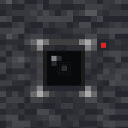
| Deepslate Camera | A deepslate-styled block that acts as a fixed viewpoint. Doesn't do anything on its own until viewed through a Camera Station. |
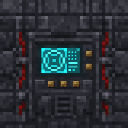
| Camera Station | A deepslate-and-iron control block. Interact with it to pull up a live view from the nearest Deepslate Camera. |
How To Use
- Placing cameras: Set up one or more Deepslate Cameras wherever you want a monitored view — entrances, farms, bases, or anywhere you want to keep watch over remotely.
- Using the station: Interact with a Camera Station to search for the nearest Deepslate Camera within 64 blocks (vertically within 24 blocks). If one is found, your view switches to a free-floating camera positioned at that camera block, facing north.
- Ending the feed: The feed automatically closes after 20 seconds, or you can interact with the station again at any time to close it immediately.
- No camera in range: If no Deepslate Camera exists within range, the station will tell you none was found — place a camera closer to the station and try again.
- Breaking blocks: Both the camera and station drop themselves as items when mined, so you can relocate them freely.
Crafting And Obtaining
Both blocks are crafted at a crafting table using iron ingots, redstone, deepslate, and (for the camera) glass panes.





Abilities And Mechanics
- Each Camera Station always connects to the single nearest Deepslate Camera in range — it does not let you choose between multiple cameras.
- The camera view is fixed, always facing north from the camera's position, giving a consistent surveillance angle.
- Feeds run on a timer (20 seconds) and will end automatically even if you forget to close them, returning your normal view.
- Search range is generous (64 blocks horizontally, 24 blocks vertically), so a single station can cover a wide area if cameras are placed within range.
Progression And Strategy
Use Deepslate Cameras to watch over farms, entrances, or danger zones without needing to stand there yourself. Build a central Camera Station in your base and place multiple cameras throughout your build — the station will always link to whichever camera is closest to it, so plan camera placement with that in mind if you want to monitor a specific location reliably.
How to install
Download the mod and follow the step-by-step installation guide.
This mod is licensed under the CreativeMode Mods License.