


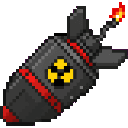
Description
The Death Nuke is a devastating single-use weapon that triggers a massive explosion after a 10-second countdown. Simply right-click to activate it, and you will receive a warning message in chat as escalating beeps count down the final seconds before detonation. When it goes off, a catastrophic blast tears through a 100-block radius, igniting the landscape with thousands of fire blocks, flinging all nearby mobs and players outward from the blast center, and filling the sky with dramatic smoke and fire particles — so make sure you are far away before it detonates!
Mod Wiki
Death Nuke
Quickstart
- Craft a Death Nuke at a crafting table using the recipe below.
- Hold it in your hand and right-click to arm it.
- Watch the chat for the countdown warning and listen for the escalating beeps.
- Run. You have 10 seconds to get well clear of the blast.
Overview
The Death Nuke is a single-use, hand-held doomsday weapon. Once activated, a 10-second countdown begins. When the timer expires, a catastrophic explosion tears through a 100-block radius, setting the landscape ablaze, hurling every nearby mob and player outward from the detonation point, and filling the sky with dramatic fire and smoke particles. One nuke, one shot — use it wisely.
What It Adds
| Item | Stack Size | Found In |
|---|---|---|
| Death Nuke | 1 (non-stackable) | Crafting / Combat creative tab |
How To Use
- Craft the Death Nuke (see recipe above).
- Right-click while holding it to start the 10-second countdown. The item is consumed immediately on activation.
- Chat warnings appear and audible beeps escalate as the countdown progresses — your only cues to evacuate.
- At zero, the blast detonates at the activation point.
⚠️ There is no way to cancel the countdown once activated. Make sure you are at least 100 blocks away before detonation.
Abilities And Mechanics
- Massive blast radius — the explosion affects everything within a 100-block sphere centered on where the nuke was armed.
- Fire spreading — thousands of fire blocks are placed across the affected terrain, turning the blast zone into an inferno.
- Knockback — all mobs and players caught in the radius are flung outward from the center of the explosion.
- Visual effects — large columns of fire and smoke particles erupt into the sky at detonation.
- Custom sound — a unique explosion sound plays at detonation, audible at great distance.
- Single-use — the item is destroyed upon activation. Each deployment requires crafting a new nuke.
Crafting And Obtaining
The Death Nuke requires two TNT blocks, six Fire Charges, and a Nether Star — a recipe that reflects both its destructive power and the effort needed to obtain it. The Nether Star alone requires defeating the Wither boss.
The recipe is unlocked automatically when you join a world.
Progression And Strategy
- Early use is gated behind the Nether Star, which requires summoning and defeating the Wither. Plan accordingly.
- The 100-block blast radius is enormous — sprint or use an Elytra to escape in time. Being underground or in an enclosed space when it detonates is almost certainly fatal.
- Because the nuke ignites the surrounding terrain, consider using it on areas you do not mind permanently altering. Desert, ocean, or already-cleared biomes are safer choices if you want to preserve your world.
- In multiplayer, the knockback effect hits all players in range, making it a powerful (and chaotic) PvP tool — or a very effective way to lose friends.
How to install
This Java mod can be used on Windows and Mac PCs with the CreativeMode Launcher or any Minecraft launcher of your choice.

1. Download and install the new CreativeMode Launcher

2. Click to play on the top of the screen.
3. That's it — launches instantly. No complicated setup required.
Want to use on a different launcher? Download mod and manually install.
This mod is licensed under the CreativeMode Mods License.