

Description
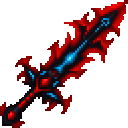
Wield the Crimson Skybreaker to slay any mob and send it soaring with a single strike.
Mod Wiki
Crimson Skybreaker
Quickstart
Get the Crimson Skybreaker from the Combat tab in Creative inventory, or craft it using the recipe below. You can also use /give @s crimson-skybreaker-f2fdf74c:crimson_skybreaker_f2fdf74c if commands are enabled.
Put it on your hotbar, select it, and attack a mob with your usual melee control. A successful hit launches the target upward and kills mobs in one strike.
Overview
Crimson Skybreaker is a powerful melee weapon. Its hits deal immense damage and send targets soaring.
What It Adds
- Crimson Skybreaker: A weapon for attacking mobs at close range. It is listed with swords and appears in the Combat tab in Creative inventory.
How To Use
Hold the weapon and strike a mob as you would with any melee weapon. Each successful hit launches its target upward; mobs are defeated in one strike.
Crafting And Obtaining
Craft the Crimson Skybreaker in a crafting table:


How to install
This Java mod can be used on Windows and Mac PCs with the CreativeMode Launcher or any Minecraft launcher of your choice.

1. Download and install the new CreativeMode Launcher

2. Click to play on the top of the screen.
3. That's it — launches instantly. No complicated setup required.
Want to use on a different launcher? Download mod and manually install.
This mod is licensed under the CreativeMode Mods License.