

Description
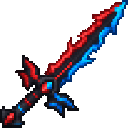
Wield a striking crimson-and-azure blade and bring bold color to every battle.
Mod Wiki
Crimson Azure Blade
Quickstart
Craft the blade using the recipe below, then place it in your hotbar and attack a creature to try its built-in fire effect. You can also find it in the Combat tab of the Creative inventory.
Overview
The Crimson Azure Blade is a single-stack sword with a crimson-and-azure design. Each successful hit sets its target on fire for 4 seconds.
What It Adds
- One sword weapon, listed as a sword.
- A built-in Flame effect that ignites enemies hit for 4 seconds.
How To Use
Hold the blade and attack as you would with any sword. Its fire effect triggers on a successful hit; no separate activation is needed. The effect is described on the blade’s tooltip.
Crafting And Obtaining
The recipe unlocks when you enter a world. Craft the blade at a crafting table:


How to install
This Java mod can be used on Windows and Mac PCs with the CreativeMode Launcher or any Minecraft launcher of your choice.

1. Download and install the new CreativeMode Launcher

2. Click to play on the top of the screen.
3. That's it — launches instantly. No complicated setup required.
Want to use on a different launcher? Download mod and manually install.
This mod is licensed under the CreativeMode Mods License.