


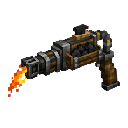
Description
The Coalfire Flamethrower is a powerful handheld weapon that fires a continuous stream of small fireballs in the direction you're looking, now firing a denser stream at about 3 shots every 4 ticks for a slightly faster attack cadence. Hold right-click to fire and release to stop; sneak + right-click will load up to 64 coal or charcoal from your inventory, and hovering over the item displays the current fuel level. Fuel is still consumed every 20 ticks, so each piece of coal or charcoal lasts twice as long compared with the baseline flamethrower, and reload behavior remains unchanged.
Mod Wiki
Coalfire Flamethrower
Quickstart
- Craft the Coalfire Flamethrower (recipe below) — it unlocks automatically when you join a world.
- With the flamethrower in hand, Sneak + Right-click to load coal or charcoal from your inventory (up to 64 pieces).
- Hold Right-click to fire a continuous stream of fireballs. Release to stop.
- Hover over the item at any time to check your current fuel level.
Overview
The Coalfire Flamethrower is a handheld combat weapon that launches a rapid, dense stream of small fireballs in whatever direction you are looking. It runs on coal or charcoal and is found in the Combat creative tab. Managing fuel is the core challenge — keep coal on hand and reload before heading into a fight.
What It Adds
- Coalfire Flamethrower — a single-slot tool/weapon that fires small fireballs continuously while right-click is held.
How To Use
| Action | Control |
|---|---|
| Fire fireballs | Hold Right-click |
| Stop firing | Release Right-click |
| Load fuel from inventory | Sneak + Right-click |
| Check fuel level | Hover over the item |
When you right-click with no fuel remaining, you receive a red chat message prompting you to reload. The flamethrower will not fire until coal or charcoal is loaded.
Crafting And Obtaining
The recipe is granted automatically when you join any world, so it appears in your recipe book from the start.
Abilities And Mechanics
Firing
- Fires 3 small fireballs every 4 ticks, producing a dense, fast-moving stream.
- Fireballs travel in the exact direction your crosshair is pointing.
- A crackling fire sound plays with each shot burst.
Fuel System
- Fuel capacity: 64 units (coal or charcoal, one piece = one unit).
- Fuel is consumed once every 20 ticks (~1 second) while firing, regardless of how many fireballs are launched per tick.
- Both coal and charcoal are valid fuel; the flamethrower pulls them directly from anywhere in your inventory on reload.
- Reloading with Sneak + Right-click fills the tank as much as possible from available coal/charcoal — you do not need to manually select a stack.
- The tooltip always shows current fuel as Fuel: X/64.
Fireball Behavior
- Fireballs are small vanilla fireballs — they ignite blocks and entities on contact.
- You are the owner of each fireball, so enemy mobs will retaliate against you if hit.
Progression And Strategy
- Gather coal early. A full tank of 64 coal gives roughly 64 seconds of continuous fire, so stock up before extended engagements.
- Charcoal is a renewable alternative. Smelt wood to produce charcoal if coal is scarce.
- Aim carefully in flammable biomes. Small fireballs ignite the environment; use in open or stone-heavy areas to avoid unintended fires.
- Keep a coal stack in your hotbar for quick mid-combat reloads — a single Sneak + Right-click is all it takes.
- The flamethrower excels at crowd control, sending multiple projectiles per second into tight groups of mobs.
How to install
This Java mod can be used on Windows and Mac PCs with the CreativeMode Launcher or any Minecraft launcher of your choice.

1. Download and install the new CreativeMode Launcher

2. Click to play on the top of the screen.

3. That's it — launches instantly. No complicated setup required.
Want to use on a different launcher? Download mod and manually install.
This mod is licensed under the CreativeMode Mods License.