

Description
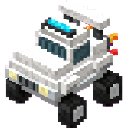
Right-click your monster truck build to fly it through the skies on puffy clouds!
Mod Wiki
Cloud Crusher Truck
Quickstart
- Craft the Cloud Crusher Truck item using the recipe below.
- Place it on the ground like a block — it will automatically build itself into a full-size monster truck made of multiple parts.
- Right-click the truck to hop into the driver's seat.
- Use W/A/S/D to drive/steer and Space to climb into the sky. Once airborne, you're flying!
- Press Shift to descend, and Sprint (Ctrl) to hop out and dismount.
Overview
Cloud Crusher Truck turns a single crafted item into a large, ready-to-drive monster truck that can be piloted directly into the sky. Once placed, it assembles itself as a multi-part structure, and stepping into it as a driver lets you cruise across the ground or soar up among the clouds. It behaves like a hybrid vehicle: part off-road truck, part flying machine.
What It Adds
- Cloud Crusher Truck (item/block): A single craftable item that, when placed, builds a complete large-scale truck model out of multiple connected structure blocks.
- A rideable flying vehicle: Right-clicking the assembled truck seats a driver inside an invisible pilot entity that controls the whole model as one unit.
- Flight HUD: While riding, a heads-up display shows your speed, altitude, and heading, along with control reminders.
- Automatic third-person camera: Hopping into the truck switches your camera to a chase view so you can see the whole vehicle in action; leaving the truck restores your previous view.
How To Use
- Place it: Placing the Cloud Crusher Truck item on the ground causes the full multi-part truck structure to spring into place, oriented to face away from you.
- Board it: Right-click any part of the assembled truck to climb aboard. Only one driver can pilot it at a time.
- Drive/Fly it:
- W — accelerate forward
- S — reverse (slower)
- A / D — strafe left/right
- Space — ascend into the sky
- Shift — descend
- Sprint key — dismount and hop out
- Gravity: Without holding Space or Shift, the truck drifts gently downward, so hovering requires light taps of Space to hold altitude.
- Durability: The truck can be destroyed by damage. If it's destroyed while unattended, it drops back into a Cloud Crusher Truck item you can place again.
Crafting And Obtaining
Craft the Cloud Crusher Truck using the recipe below. It combines wool and feathers for the "clouds", iron blocks for the frame, rubber for tires, and TNT for engine power.


Abilities And Mechanics
- Multiblock assembly: The truck isn't a single block — placing the main item generates dozens of connected structure parts that together form the full vehicle model.
- Single-seat piloting: Only the person driving becomes invisible and takes control; the truck itself remains visible and renders the full assembled model around the pilot.
- No fall damage or gravity while airborne: The truck ignores normal gravity, letting you hover in place or climb freely.
- Automatic camera handling: Mounting the truck nudges your perspective to third-person so you can appreciate the vehicle; exiting restores your prior camera view.
Progression And Strategy
There is no tiered progression — a single craft unlocks the complete flying truck experience. Focus your strategy on:
- Gathering the ingredients (wool, feathers, iron blocks, rubber, and TNT) for the one-time craft.
- Choosing open, flat terrain to place the truck since it assembles as a large structure.
- Practicing altitude control with Space/Shift taps for smooth hovering and cloud-level cruising.
- Keeping the truck away from harm, since taking damage will destroy it (though it returns as a reclaimable item).
How to install
This Java mod can be used on Windows and Mac PCs with the CreativeMode Launcher or any Minecraft launcher of your choice.

1. Download and install the new CreativeMode Launcher

2. Click to play on the top of the screen.

3. That's it — launches instantly. No complicated setup required.
Want to use on a different launcher? Download mod and manually install.
This mod is licensed under the CreativeMode Mods License.