

Description
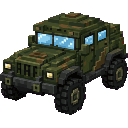
This mod adds the Camo Thunder Jeep — a craftable, camouflaged, very-fast armored 5x5x5 vehicle with an enclosed light‑blue glass cockpit, built from 5 Armored Car Parts, 1 Engine and 2 Wheels (recipes unchanged; parts appear in the Car Parts creative tab). Place and spawn the jeep from its item and drive it like a mount: WASD to steer, Space for a much higher hop, Sprint to dismount (you can re-enter), and the rider is tucked inside the cockpit; mounting now forces first‑person and hides cockpit pieces that blocked your forward view so you can see out the front while others still see the full jeep. The cockpit HUD is now two lines (one for jeep status/No fuel needed and one for controls) and periodically reminds you of features; the jeep remains armored and damageable, automatically climbs single‑block obstacles and now always performs a small upward bump when it runs into a block to reliably clear 1‑block obstacles, and drops itself when destroyed.
Mod Wiki
Camo Thunder Jeep
Quickstart
- Open the Car Parts creative tab (or craft the components below) to get all the items you need.
- Craft the Camo Thunder Jeep item and right-click any solid block surface to place and instantly mount the jeep.
- Drive with W/A/S/D, press Space for a high hop, and hold Sprint to dismount. Right-click the jeep to remount.
Overview
The Camo Thunder Jeep is a large, camouflaged armored vehicle spanning a 5×5×5 footprint. It features a light-blue glass cockpit, requires no fuel, and is fast enough to tear across terrain at high speed. The jeep is damageable, saves its health between sessions, and drops itself as an item when destroyed so you never permanently lose it.
What It Adds
| Item | Description |
|---|---|
| Camo Thunder Jeep | The vehicle item — place it on any surface to spawn and mount the jeep |
| Armored Car Part | Crafting component for the jeep |
| Engine | Crafting component for the jeep |
| Wheel | Crafting component for the jeep |
All four items appear in the Car Parts creative tab.
Crafting And Obtaining
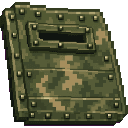
Armored Car Part
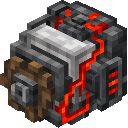

Engine


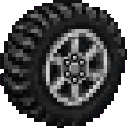
Wheel

Camo Thunder Jeep

The final jeep recipe uses 5 Armored Car Parts, 1 Engine, and 2 Wheels.
How To Use
Spawning the jeep: Hold the Camo Thunder Jeep item and right-click the top of any block. The jeep spawns on that surface facing away from you, and you are placed inside the cockpit automatically.
Remounting: Right-click the jeep entity to climb back in at any time.
Driving controls:
| Input | Action |
|---|---|
| W / S | Accelerate forward / reverse |
| A / D | Strafe left / right |
| Space | High hop (much larger than a normal jump) |
| Sprint | Dismount |
First-person cockpit: Mounting forces your camera into first-person view. Cockpit panels that would block your forward sightline are hidden for you, while other players still see the complete jeep model. Your previous camera setting is restored when you dismount.
Abilities And Mechanics
- No fuel needed — the jeep runs indefinitely.
- Auto-climb — the jeep automatically handles single-block obstacles. When the front bumps into a 1-block-high wall it performs a small upward nudge to reliably clear it without stopping.
- Armored and damageable — the jeep has 80 HP. It takes damage from hits and drops itself as an item when destroyed, letting you pick it back up and place it again.
- Cockpit HUD — while driving, two lines are displayed at the top of your screen:
- Status line: current HP out of 80 and a "No fuel needed" reminder.
- Controls line: a quick-reference for driving, hopping, auto-climb, and dismounting.
- Rider invisibility — while you are seated, your player model is hidden inside the cockpit so it does not clip through the vehicle visually.
Progression And Strategy
- Craft Armored Car Parts first — you need five, so gather plenty of iron and copper ingots before sitting down at the crafting table.
- The Engine requires 8 Redstone surrounding 1 Iron Block, making it the most resource-intensive component. Prioritize a mine trip for redstone early.
- Because the jeep drops itself on destruction, keep a spare in your inventory when exploring dangerous terrain.
- The high Space hop can clear ravines and walls that would stop a normal sprint-jump, making the jeep useful for traversal as well as speed runs across open ground.
How to install
This Java mod can be used on Windows and Mac PCs with the CreativeMode Launcher or any Minecraft launcher of your choice.

1. Download and install the new CreativeMode Launcher

2. Click to play on the top of the screen.

3. That's it — launches instantly. No complicated setup required.
Want to use on a different launcher? Download mod and manually install.
This mod is licensed under the CreativeMode Mods License.