

Description
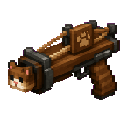
Fire cats across the world with the Brown Catapult!
Mod Wiki
Brown Catapult
Quickstart
- Craft the Brown Catapult or take it from the Combat tab in the Creative inventory.
- Hold it in either hand.
- Aim in the direction you want to fire.
- Use the item to launch a cat forward with a slight upward boost.
- Wait about one second before firing again.


Overview
The Brown Catapult is a reusable weapon that launches cats through the world. It creates a cat in front of you and propels it in the direction you are looking.
What It Adds
- Brown Catapult — a single-stack item that fires cats.
- Launched cats use Minecraft’s standard cat appearance and behavior.
- The catapult is available in the Combat creative inventory tab.
- No ammunition is consumed when firing.
How To Use
Hold the Brown Catapult and press the item-use button:
- The cat appears slightly in front of your view.
- It travels in the direction you are looking.
- The launch includes a small upward boost.
- A catapult sound plays when the cat is fired.
- The item has a one-second cooldown between launches.
Aim upward to send cats higher, or aim across the horizon to launch them farther forward.
Crafting And Obtaining
Craft the Brown Catapult with the recipe below:
In Creative mode, you can also obtain it directly from the Combat tab.
Abilities And Mechanics
- The Brown Catapult can be used repeatedly.
- Each activation spawns and launches one cat.
- The catapult holds one item per inventory slot.
- The launch direction follows the player’s current look direction.
- The short cooldown prevents continuous firing.
Progression And Strategy
Try using the catapult from elevated positions or across open areas to see how far the launched cats travel. Aim carefully when firing near structures, terrain, or other entities.
How to install
This Java mod can be used on Windows and Mac PCs with the CreativeMode Launcher or any Minecraft launcher of your choice.

1. Download and install the new CreativeMode Launcher
2. Click to play on the top of the screen.
3. That's it — launches instantly. No complicated setup required.
Want to use on a different launcher? Download mod and manually install.
This mod is licensed under the CreativeMode Mods License.