

Description
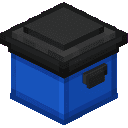
The Blue Bin Cache is a compact single-block storage unit that provides 81 inventory slots in a 1x1x1 footprint; place it like any block and right-click to open and manage its contents. Sneak + right-click the placed bin to pick it up as an item while preserving everything inside, making it easy to relocate with all stored items intact. While holding the Blue Bin Cache item you can Sneak + right-click a chest, barrel, or other compatible container to quickly unload its contents, and pickup reliably removes the block and keeps its contents even when only the main block exists.
Mod Wiki
Blue Bin Cache
Quickstart
- Craft the Blue Bin Cache at a crafting table (black concrete top row, blue concrete for the remaining two rows):


- Place the bin anywhere like a normal block — it fits in a single 1×1×1 space.
- Right-click the placed bin to open its 81-slot inventory and store items.
- Sneak + Right-click the placed bin to pick it up as an item with all contents preserved.
- Sneak + Right-click a chest, barrel, or other container while holding the bin item to bulk-unload its contents into that container.
Overview
Blue Bin Cache adds a garbage-can-style storage block — blue body, black lid — that occupies exactly one block of space and holds 81 inventory slots. It can be picked up and moved without losing a single stored item, and it can dump its contents into any compatible container in one action.
What It Adds
- Blue Bin Cache — a 1×1×1 decorative storage block styled as a blue garbage can with a black lid. Provides 81 inventory slots and can be transported as an item while retaining its full contents.
How To Use
Opening the Inventory
Right-click the placed bin to open the 9×9 inventory screen and manage stored items normally.
Picking Up the Bin (with Contents)
Sneak + Right-click the placed bin to remove it from the world and add it to your inventory as an item. All stored items remain packed inside it. The item tooltip will show "Contains stored items" in aqua text while it is holding anything.
Emptying Into a Container
Hold the Blue Bin Cache item and Sneak + Right-click any chest, barrel, or other inventory block. The bin will transfer as many items as possible into that container — merging with existing stacks first, then filling empty slots. You will see a green action-bar message confirming how many items were moved, or a red message if the target is full. Any items that do not fit stay stored in the bin.
Tooltip reminders shown on the item:
- Holds 81 items
- Sneak + Right-click bin to pick up
- Sneak + Right-click chest to empty
Crafting And Obtaining
Top row: black concrete (forms the lid). Middle and bottom rows: blue concrete (forms the body). Yields one Blue Bin Cache.
Abilities And Mechanics
- 81 storage slots — exceeds a double chest (54 slots), ideal for bulk item storage in a compact footprint.
- Portable — Sneak + Right-click to pick the bin up; place it again anywhere. Contents are never lost.
- Smart unloading — when emptying into a container, existing matching stacks are topped up first, then empty slots are filled. Overflow stays in the bin.
- Visual indicator — the item tooltip displays "Contains stored items" in aqua whenever the bin is carrying items.
Progression And Strategy
- Craft the Blue Bin Cache early; blue and black concrete are inexpensive and easy to obtain.
- Use it as a mobile collection bin while mining or farming: pick it up when full, carry it to your base, then Sneak + Right-click a storage chest to unload everything in one action.
- Because the bin keeps its contents when picked up, it serves well as a temporary drop-off cache during builds or expeditions spanning multiple locations.
- With 81 slots, a single bin can replace a large bank of chests for temporary or on-the-go storage needs.
How to install
This Java mod can be used on Windows and Mac PCs with the CreativeMode Launcher or any Minecraft launcher of your choice.

1. Download and install the new CreativeMode Launcher
2. Click to play on the top of the screen.
3. That's it — launches instantly. No complicated setup required.
Want to use on a different launcher? Download mod and manually install.
This mod is licensed under the CreativeMode Mods License.