

Description
Play a full 3D guitar, wear it right, strum with both hands, and start safely every time.
Mod Wiki
Blocky Guitar
Quickstart
- Craft the Blocky Guitar using the recipe below.
- Place it down to build a full-size 3D guitar model in the world, or find the Playable Guitar item in the Functional creative tab to play one directly from your hands.
- Hold the Playable Guitar and use it (right-click / use item) to start strumming — hold the button down to keep playing.
- Watch your character's arms automatically pose into a strumming stance while the guitar plays.
Overview
Blocky Guitar adds a decorative, buildable 3D guitar structure along with a fully playable handheld guitar item. Place the block form as a piece of furniture/decoration, or carry the instrument version to perform anywhere, anytime, with realistic two-handed strumming animations and guitar sounds.
What It Adds
- Blocky Guitar — a placeable multi-block structure that assembles a detailed 3D guitar model when placed.
- Playable Guitar — a handheld item found in the Functional creative tab that lets you play guitar sounds on demand, complete with custom arm animations.
How To Use
Placing the Decorative Guitar
Craft and place the Blocky Guitar item like a normal block. When placed, it automatically builds out the full multi-block guitar structure around the spot you clicked, rotating to face away from you so the front of the guitar faces the player. All of the extra blocks that make up the model are placed automatically — you only need to place the one main block.
Playing the Handheld Guitar
Pick up the Playable Guitar item and use it (hold the use button/right-click) to begin playing:
- Your character raises the fretting hand along the neck and strums with the other arm in a repeating motion, visible in both first-person and third-person view.
- Guitar notes play continuously while you hold the button, with slight pitch variation for a natural sound.
- Releasing the button stops the performance immediately — no lingering sound.
The instrument can be played indefinitely; there's no cooldown or durability loss, so feel free to jam whenever you like.
Crafting And Obtaining
Craft the placeable Blocky Guitar block using:


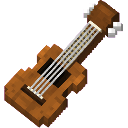
The Playable Guitar handheld item is not crafted — it can be obtained directly from the Functional creative inventory tab alongside the placeable guitar block.
Abilities And Mechanics
- Multi-block assembly — placing the Blocky Guitar block automatically fills in every additional part of the 3D model, so the whole guitar appears at once with correct rotation based on the direction you were facing.
- Two-handed strumming animation — while actively using the Playable Guitar, your player model's arms move independently: the left hand stays fixed on the neck while the right hand strums across the body, visible to yourself and other nearby players.
- Safe start every time — using the instrument always begins cleanly with no leftover animation or sound state carried over from previous uses; releasing the input stops everything instantly.
- Ambient guitar tone — each strum plays a note-block guitar sound with a small randomized pitch shift, so repeated playing doesn't sound robotic.
Progression And Strategy
There's no combat or survival mechanic tied to Blocky Guitar — it's purely a decorative and roleplay/performance tool. Craft one guitar block for your build, and carry the Playable Guitar item to entertain yourself or other players whenever you want some music in your world.
How to install
This Java mod can be used on Windows and Mac PCs with the CreativeMode Launcher or any Minecraft launcher of your choice.

1. Download and install the new CreativeMode Launcher
2. Click to play on the top of the screen.
3. That's it — launches instantly. No complicated setup required.
Want to use on a different launcher? Download mod and manually install.
This mod is licensed under the CreativeMode Mods License.