

Description
Carry daylight into the darkness with the Blazebright Flashlight.
Mod Wiki
Blazebright Flashlight
Quickstart
- Craft the flashlight with one Glowstone, one Copper Ingot, and one Redstone Torch:


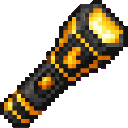
- Hold the Blazebright Flashlight in your main hand or off-hand.
- Use it—right-click by default—to toggle it on.
- Explore dark areas with the light active. Use the item again to turn it off.
You can also obtain it from the Functional item group in Creative mode. The crafting recipe becomes available after joining a world.
Overview
The Blazebright Flashlight is a handheld light source that carries a full-strength light around with you. When active, it creates a temporary light level 15 light at your eye position and moves that light as you move.
The flashlight is a single-item tool and cannot be stacked.
What It Adds
- Blazebright Flashlight — a toggleable handheld light.
- Temporary light that follows the player while the flashlight is active.
- Main-hand and off-hand support.
- Light level 15 illumination.
How To Use
Toggle the flashlight
Use the flashlight while holding it in either hand:
- On: creates the temporary light around your current position.
- Off: removes the temporary light.
- Switching hands does not deactivate it as long as the flashlight remains active in one of your hands.
The flashlight makes a lever-click sound when toggled.
Moving with the flashlight
The light follows you as you walk, run, jump, or change position. It is placed at the block position containing your eyes, so it illuminates the area around you naturally.
When you stop holding an active flashlight, its temporary light is removed.
Obstructed spaces
The flashlight only creates light in an empty air block. It does not replace blocks, fluids, or existing light blocks. If the space at your eye position is occupied, the flashlight waits until a clear space is available.
Crafting And Obtaining
Craft the flashlight in a crafting table using:
- 1 Glowstone
- 1 Copper Ingot
- 1 Redstone Torch
The arrangement places Glowstone above the Copper Ingot, with the Redstone Torch below it:
In Creative mode, the flashlight is found in the Functional item group.
Abilities And Mechanics
- Full-strength illumination: The active light uses light level 15.
- Temporary placement: The light is maintained while the flashlight is active rather than permanently placing a light source in the world.
- Automatic movement: The light relocates as you move.
- Safe around builds: It will not overwrite a real block, fluid, or another light block.
- Either hand: The flashlight works from the main hand or off-hand.
- Toggle control: Use the item to switch between active and inactive states.
Progression And Strategy
Craft one early when exploring caves, mineshafts, or other dark areas. Keeping it in your off-hand lets you use your main hand for tools, weapons, or blocks while carrying mobile illumination.
If the light does not appear in a tight space, move into an open air block. The flashlight will resume producing light once there is room at your eye position.
How to install
This Java mod can be used on Windows and Mac PCs with the CreativeMode Launcher or any Minecraft launcher of your choice.

1. Download and install the new CreativeMode Launcher

2. Click to play on the top of the screen.

3. That's it — launches instantly. No complicated setup required.
Want to use on a different launcher? Download mod and manually install.
This mod is licensed under the CreativeMode Mods License.