


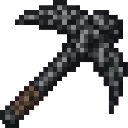
Description
The Bedrock Chunkbreaker is a devastating pickaxe that, when you mine a block or use (right‑click) on a block, instantly removes every non‑bedrock block in the entire 16×16 chunk column from the bottom of the world up to the sky, leaving a massive open pit while preserving bedrock. The effect skips air and correctly respects world height limits, so only actual blocks are cleared. Using it in survival will consume the pickaxe’s durability (creative mode is exempt); trigger it by either breaking any block with the tool or right‑clicking a block to activate the column destruction.
Mod Wiki
Bedrock Chunkbreaker
Quickstart
- Join any world — the recipe is unlocked automatically.
- Craft the Bedrock Chunkbreaker (see recipe below).
- Hold it in your hand and either left-click to mine any block or right-click any block surface.
- Watch the entire 16×16 chunk column instantly hollow out from bedrock to the sky.
Overview
The Bedrock Chunkbreaker is a single, supremely powerful pickaxe. One activation wipes every non-bedrock block in the full chunk column you are standing in — from the very bottom of the world all the way to build height — leaving a clean, open pit in seconds. Bedrock layers are never touched, so the floor of the world remains intact.
What It Adds
A single item: the Bedrock Chunkbreaker. It is a Netherite-tier pickaxe, found in the Tools & Utilities creative tab, and it stacks to 1.
How To Use
There are two ways to trigger the chunk-clearing effect:
| Action | How |
|---|---|
| Mine a block | Left-click any block as you would a normal pickaxe. The block breaks normally, then the entire chunk column clears. |
| Right-click a block | Point at any block surface and right-click. No block is mined first — the column clears immediately. |
The destruction covers the full 16×16 chunk column aligned to chunk boundaries (not centered on you), spanning every Y level the world supports. Air blocks and bedrock are skipped; everything else is removed instantly with no drops.
Abilities And Mechanics
- Chunk-aligned clearing: The affected area is always the full 16×16 chunk the targeted block belongs to, regardless of where inside that chunk you click.
- Bedrock preserved: Bedrock at any Y level is never removed.
- World-height aware: The sweep respects the world's actual minimum and maximum Y values, so it works correctly in the Nether, the End, and custom dimensions alike.
- Durability consumption: In Survival mode, each right-click use costs 1 durability point. Mining a block costs durability through the normal tool-use system. In Creative mode, no durability is consumed.
- Netherite-tier stats: The Chunkbreaker inherits Netherite pickaxe mining speed, attack damage, and enchantability. It can be enchanted and repaired as a Netherite tool.
Crafting And Obtaining
The recipe is automatically granted when you first join a world, so you never need to discover it. Craft it at a crafting table:
The recipe requires 8 Diamond Blocks, a Diamond Pickaxe, and a Nether Star — reflecting the enormous power of the tool.
Progression And Strategy
- Preparation: Gather the materials before you need the tool. The Nether Star requires defeating the Wither, making this a late-game item.
- Mining applications: Use it to instantly excavate a full chunk for large base builds, strip-mining, or clearing space for mega-structures — what would take hours by hand happens in an instant.
- Durability management: In Survival, prefer left-click mining over right-click when you want to mine a specific block anyway, since the durability cost is the same but you also collect that block. Reserve right-click for situations where you just want the column cleared quickly.
- Be careful where you point: The effect triggers on the chunk you target, not the chunk you stand in. Make sure you are not accidentally clearing an adjacent chunk containing your builds or resources.
- Creative use: In Creative mode there is no durability cost, making it ideal for rapid terrain sculpting and large-scale world editing.
How to install
This Java mod can be used on Windows and Mac PCs with the CreativeMode Launcher or any Minecraft launcher of your choice.

1. Download and install the new CreativeMode Launcher

2. Click to play on the top of the screen.
3. That's it — launches instantly. No complicated setup required.
Want to use on a different launcher? Download mod and manually install.
This mod is licensed under the CreativeMode Mods License.