


Description
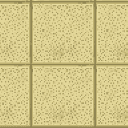
The Backrooms Ceiling Tile is a decorative building block inspired by the iconic dropped ceiling tiles found in the Backrooms. It has stone-like durability, making it a sturdy choice for building atmospheric interior spaces. Craft it by arranging 4 Quartz Blocks in a 2x2 pattern to receive 4 tiles, then place them just like any other block.
Mod Wiki
Backrooms Ceiling Tile
Quickstart
- Open your crafting table and craft the Backrooms Ceiling Tile using the recipe below — you'll get 6 tiles per craft.
- Find the tile in the Building Blocks creative tab, or craft it in Survival.
- Place it like any normal block to build eerie, liminal interior ceilings.
Overview
Backrooms Ceiling Tile is a single decorative block mod that brings the unsettling aesthetic of the Backrooms into Minecraft. The tile replicates the look of a classic dropped office ceiling, perfect for building creepy interior spaces, liminal rooms, bunkers, or any atmospheric build that needs that "wrong place" feeling.
What It Adds
| Block | Description |
|---|---|
| Backrooms Ceiling Tile | A stone-tier decorative block with a dropped ceiling tile texture, found in the Building Blocks creative tab. |
How To Use
Place the Backrooms Ceiling Tile anywhere you would place a normal block. It works best lining the ceilings and walls of indoor rooms to recreate that iconic fluorescent-lit, slightly-off corridor atmosphere. Because it has stone-like properties, it holds up well in survival builds and won't be easily destroyed by minor explosions.
Crafting And Obtaining
The recipe uses Quartz Blocks, Stone, and White Concrete arranged in a specific pattern, yielding 6 tiles per craft. The recipe is unlocked automatically when you join a world.
Abilities And Mechanics
- Durability: Stone-equivalent strength (hardness 1.5, blast resistance 6.0) — sturdy enough for serious builds.
- Mining tool: A pickaxe is the correct tool to mine it efficiently.
- Drop behavior: Breaking the block drops one tile (unless destroyed by an explosion with bad timing).
- Placement: Functions identically to any full-size solid block — stackable, connectable, and usable as a structural element.
Progression And Strategy
In Survival mode, the main resource requirement is Quartz Blocks, which means a trip to the Nether to gather Nether Quartz. Stock up on quartz before building large rooms, since fully tiling a ceiling or set of walls will require a good number of crafts. Once you have quartz, Stone and White Concrete are easy to produce in bulk, keeping ongoing costs low.
How to install
This Java mod can be used on Windows and Mac PCs with the CreativeMode Launcher or any Minecraft launcher of your choice.

1. Download and install the new CreativeMode Launcher

2. Click to play on the top of the screen.

3. That's it — launches instantly. No complicated setup required.
Want to use on a different launcher? Download mod and manually install.
This mod is licensed under the CreativeMode Mods License.