


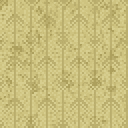
Description
The Backroom Block is a buildable block inspired by the iconic yellow wallpaper aesthetic of the backrooms. It shares the same durability and mining requirements as stone, so you will need a pickaxe to break it efficiently. Place it anywhere in your world to create atmospheric backrooms-themed builds, and find it in the Building Blocks creative tab.
Mod Wiki
Backroom Block
Quickstart
- Open your inventory and navigate to the Building Blocks creative tab to find the Backroom Block, or craft it using the recipe below.
- Place the block anywhere in your world to instantly set a backrooms atmosphere.
- To break it, use a pickaxe — it has the same hardness as stone, so bare hands are inefficient.
Overview
Backroom Block is a decorative building block styled after the iconic yellow wallpaper of the internet's mythic "backrooms." It blends seamlessly into moody, liminal-space builds and is tough enough to hold up in survival play, requiring a pickaxe to mine efficiently just like stone.
What It Adds
| Block | Description | Creative Tab |
|---|---|---|
| Backroom Block | Decorative yellow-wallpaper-themed full block | Building Blocks |
Crafting And Obtaining
Craft four Backroom Blocks at a time using sandstone, white carpet, and glowstone arranged in a crafting table:
The recipe is unlocked automatically as soon as you join a world — no prerequisites required.
Abilities And Mechanics
- Stone-equivalent durability — shares the same hardness and blast resistance as stone.
- Pickaxe required — mining without a pickaxe is slow; any tier of pickaxe mines it efficiently.
- Drops itself — breaking the block (with a pickaxe) always returns one Backroom Block, unless destroyed by an explosion at close range.
- Full solid block — behaves like any standard full block for building, stacking, and structural purposes.
Progression And Strategy
Because the Backroom Block requires only sandstone, white carpet, and glowstone, it is accessible fairly early in a survival playthrough. A single craft yields 4 blocks, making large-scale decorative builds practical without excessive resource gathering. Pair it with dim lighting, low ceilings, and yellow-toned blocks to recreate the unsettling, endless-hallway feel of the backrooms aesthetic.
How to install
This Java mod can be used on Windows and Mac PCs with the CreativeMode Launcher or any Minecraft launcher of your choice.

1. Download and install the new CreativeMode Launcher

2. Click to play on the top of the screen.

3. That's it — launches instantly. No complicated setup required.
Want to use on a different launcher? Download mod and manually install.
This mod is licensed under the CreativeMode Mods License.