Description
Craft or find an Azure Gatecaster in the Creative inventory’s Combat tab. The recipe unlocks when you join a world.


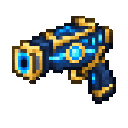
Hold the Gatecaster and use it while aiming at a block face to place your first gate. Aim at another block face in the same dimension and use it again to link the pair. Walk close to either gate to travel to the other.
To lift a mob instead, aim at it and use the Gatecaster. A mob in your line of aim takes priority over a block.
The Azure Gatecaster is a single-use-at-a-time tool for setting up a pair of personal gates or displacing mobs upward. Gates are marked by End Rod particles.
Each player has their own gate pair. The gates transport players, not mobs.
The Gatecaster stacks to one. Its crafting recipe is shown in the Quickstart section, and it is available in the Creative inventory’s Combat tab.
A successful mob hit moves the target 30 blocks upward and stops its current movement. If you’re aiming at neither a mob nor a block, the Gatecaster gives a prompt to aim at one.
Linked gates work only in the dimension where they were placed. Linking and travelling each have a brief cooldown, so you won’t immediately bounce back through a gate.
Place gates on accessible surfaces with clear space in front of each one, so you can approach them and emerge comfortably. Aim carefully when placing a pair: using the Gatecaster on a block after linking starts a fresh pair.
This Java mod can be used on Windows and Mac PCs with the CreativeMode Launcher or any Minecraft launcher of your choice.

1. Download and install the new CreativeMode Launcher
2. Click to play on the top of the screen.
3. That's it — launches instantly. No complicated setup required.
Want to use on a different launcher? Download mod and manually install.
This mod is licensed under the CreativeMode Mods License.

