


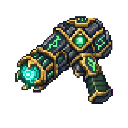
Description
The Arcane Gauntlets are a magical weapon that lets you fire powerful energy blasts at your enemies. Right-clicking fires a quick arcane blast that deals damage and knocks enemies back, while holding right-click for about 1.5 seconds charges up a devastating beam that hits much harder and sends foes flying. Sneaking and right-clicking activates a protective arcane shield, briefly granting you damage resistance and absorption to help you survive tough fights.
Mod Wiki
Arcane Gauntlets
Quickstart
- Craft the Arcane Gauntlets using the recipe below and hold them in your hand.
- Right-click to fire a quick arcane blast at a nearby enemy — it deals magic damage and knocks them back.
- Hold right-click for about 1.5 seconds to charge up a powerful beam that hits much harder and launches foes away.
- Sneak + right-click to pop an arcane shield that briefly makes you highly resistant to damage and grants bonus absorption hearts.
Overview
The Arcane Gauntlets are a magical combat item that give you three distinct combat tools in one: a rapid-fire arcane blast, a charged devastation beam, and a defensive shield ability. They fit in the Combat creative tab and are worn as a glove-slot item.
What It Adds
| Content | Description |
|---|---|
| Arcane Gauntlets | A single wearable/holdable weapon item with three combat abilities |
| Arcane Blast Projectile | The physical projectile fired by the gauntlets, visible with particle trails |
How To Use
Quick Blast
Right-click while holding the gauntlets to instantly fire an arcane blast projectile. It travels in a nearly straight line, deals 6 magic damage, and knocks the target back. On impact you'll see enchantment-style particle sparks.
Charged Beam
Hold right-click and keep it held. After about 1.5 seconds of charging (shown by swirling enchantment particles around you), the blast becomes fully charged — indicated by dragon breath particles. Release to fire a charged projectile that deals 14 magic damage and sends enemies flying with powerful knockback. The charged projectile also leaves a glowing soul-fire trail as it flies.
Arcane Shield
Sneak and right-click to activate the arcane shield. This instantly grants you:
- Resistance IV — dramatically reduces incoming damage
- Absorption II — gives you bonus hearts to absorb hits
Both effects last for 4 seconds. After activating, the shield goes on a 10-second cooldown before it can be used again. Activation is accompanied by a beacon-like sound and a burst of end-rod particles around your body.
Crafting And Obtaining
The Arcane Gauntlets are crafted at a crafting table. The recipe unlocks automatically when you enter a world.
The recipe calls for Ender Pearls, a Gold Ingot, Diamonds, Blaze Powder, and an Amethyst Shard, reflecting the gauntlets' blend of arcane and nether energy.
Abilities And Mechanics
| Ability | Trigger | Damage | Knockback | Duration / Cooldown |
|---|---|---|---|---|
| Quick Blast | Right-click | 6 (magic) | Moderate | Instant, no cooldown |
| Charged Beam | Hold right-click ~1.5 s | 14 (magic) | Very strong | Instant, no cooldown |
| Arcane Shield | Sneak + right-click | — | — | 4 s effect / 10 s cooldown |
- Projectiles travel nearly flat with minimal gravity and despawn after 5 seconds if they don't hit anything.
- Both projectile types deal magic damage, bypassing armor to some degree.
- The gauntlet cannot damage its own wielder.
Progression And Strategy
- Craft the gauntlets once you have access to the Nether for blaze powder and enough diamonds — they are mid-to-late game materials.
- In tough fights, open with the arcane shield to absorb the first hits, then alternate quick blasts for mobile targets and charged beams for high-health enemies.
- The charged beam is ideal for boss fights or tightly grouped mobs, as its extreme knockback can clear space around you.
- Keep track of your shield cooldown (shown by the item cooldown indicator on your hotbar) and activate it proactively before taking a big hit rather than reactively after.
How to install
This Java mod can be used on Windows and Mac PCs with the CreativeMode Launcher or any Minecraft launcher of your choice.

1. Download and install the new CreativeMode Launcher

2. Click to play on the top of the screen.

3. That's it — launches instantly. No complicated setup required.
Want to use on a different launcher? Download mod and manually install.
This mod is licensed under the CreativeMode Mods License.