CreativeMode

Creative
Mode

ExploreModJamsCreateJoin our community
Sign in
Craft first mod
CreativeMode

Creative
Mode

Sign in
Create
Account
Community
Resources

Create without limits.

Privacy PolicyTerms of Use

© 2026 CreativeMode. Not an official Minecraft product. Not approved by or associated with Mojang or Microsoft.

CREATIVEMODE
    Create
    Account
    Community
    Resources

    Create without limits.

    Privacy PolicyTerms of Use

    © 2026 CreativeMode. Not an official Minecraft product. Not approved by or associated with Mojang or Microsoft.

    CREATIVEMODE
    v8
    MC Java 1.21.5
    Staff Pick

    Pharaohs Pyramid Vehicle

    by
    drewgoesboo
    drewgoesboo

    77 downloads

    v8
    MC Java 1.21.5
    Staff Pick

    Pharaohs Pyramid Vehicle

    by
    drewgoesboo
    drewgoesboo

    77 downloads

    Description:

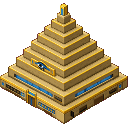
    Pharaoh’s Pyramid Vehicle lets you deploy and drive a massive stepped pyramid (13×13 base, 8‑block tall shell) that flattens and rebuilds the ground as it moves while refusing to step into spaces that would clip, sink, or overlap; right‑click any exterior block to enter Driver Mode (you sit in a fixed driver seat centered 2 blocks above the base) and steer with WASD at 2.2 blocks/sec (speed shown in the action bar). The Eye of Ra teleports you into a persistent 17×17×12 pocket home with a return portal that still remounts you back into the driver seat, while the Pyramid Exit Sign now returns you to the top center of the mobile pyramid and forcibly dismounts you before and after teleport so you’re free to move alone atop it. Shift dismounts, Space triggers a Sandstorm Burst (10s cooldown), the Heart of Ra toggles movement so you can look freely while steering, and the moving pyramid produces golden edge glows, lit hieroglyphs, warm chanting, drifting sand motes and a sandstone dust trail while violently shoving mobs out of its swept path.

    Mod Wiki

    Pharaoh's Pyramid Vehicle

    Quickstart

    1. Craft the Heart of Ra — you need this first:
    minecraft:gold_block
    minecraft:lapis_block
    minecraft:gold_block
    minecraft:lapis_block
    minecraft:nether_star
    minecraft:lapis_block
    minecraft:gold_block
    minecraft:lapis_block
    minecraft:gold_block
    Arrow
    pharaohs-pyramid-vehicle-ghtqtvaq:heart_of_ra
    1. Craft the Mobile Pyramid using the Heart of Ra:
    minecraft:smooth_sandstone
    minecraft:smooth_sandstone
    minecraft:smooth_sandstone
    minecraft:smooth_sandstone
    pharaohs-pyramid-vehicle-ghtqtvaq:heart_of_ra
    minecraft:smooth_sandstone
    minecraft:smooth_sandstone
    minecraft:smooth_sandstone
    minecraft:smooth_sandstone
    Arrow
    pharaohs-pyramid-vehicle-ghtqtvaq:mobile_pyramid
    1. Deploy the pyramid — hold the Mobile Pyramid item and right-click the top face of any solid block. The pyramid spawns as a massive 13×13 base, 8-block-tall stepped structure centered on that point. You need a clear 13×13×8 space; the pyramid will refuse to spawn if terrain would clip it.

    2. Enter Driver Mode — right-click any block on the pyramid's exterior. You are seated 2 blocks above the base in a fixed driver seat.

    3. Steer with WASD at 2.2 blocks/sec. Your current speed and sandstorm cooldown are shown in the action bar. Shift to dismount.


    Overview

    Pharaoh's Pyramid Vehicle is a rideable, world-reshaping vehicle mod. You craft and deploy a fully realized stepped sandstone pyramid that actually moves across the landscape — flattening terrain ahead of it and rebuilding the ground it passes over. The pyramid carries its own interior pocket dimension, has visual and audio spectacle while in motion, and comes with a suite of special blocks that control its behavior.


    What It Adds

    All items and blocks are found in the Pharaoh Tech creative tab.

    Item / BlockDescription
    Mobile PyramidDeployable item that spawns the moving pyramid vehicle
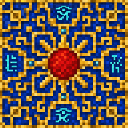
    Heart of RaCrafting ingredient and placeable block that toggles pyramid drive on/off
    Pyramid ExteriorThe sandstone shell blocks that make up the pyramid's surface
    Lit Pyramid HieroglyphGlowing hieroglyph blocks embedded in the pyramid's exterior
    Eye of RaGlowing wall block; right-click to teleport into the pocket home dimension
    Pyramid Return PortalFound inside the pocket home; right-click to teleport back to the driver seat
    Pyramid Exit SignRight-click to teleport back to the top of the pyramid and dismount freely

    How To Use

    Driving the Pyramid

    Right-click any exterior block of a deployed pyramid to enter Driver Mode. You sit in a centered, fixed driver seat. While riding:

    ControlAction
    W / A / S / DSteer the pyramid at 2.2 blocks/sec
    SpaceTrigger a Sandstorm Burst (10-second cooldown)
    ShiftDismount the pyramid

    Your action bar shows drive status, speed, and the remaining sandstorm cooldown in seconds.

    The pyramid moves one full block at a time, flattening whatever ground is ahead and cleanly rebuilding the surface it leaves. It will refuse to move into any space that would cause it to clip into terrain, sink underground, or overlap with obstacles.

    Toggling Drive Mode with the Heart of Ra

    Right-clicking a placed Heart of Ra block while the pyramid is nearby toggles the drive on and off. When drive is offline, the pyramid stays still and you can look around freely without the vehicle moving. A message confirms the current state. This is useful for taking in your surroundings before committing to a direction.

    The Eye of Ra — Pocket Home

    Right-click the Eye of Ra block on the pyramid's exterior to teleport into a persistent 17×17×12 pocket home dimension linked to your pyramid. This private space persists between sessions.

    Inside, you will find a Pyramid Return Portal — right-click it to teleport back and remount directly into the driver seat of your pyramid, ready to drive.

    The Pyramid Exit Sign — Topside Access

    Right-click the Pyramid Exit Sign block (also found inside the pyramid) to be teleported to the top center of the pyramid on the outside. You are fully dismounted before and after the teleport, so you can walk freely on top of the structure.


    Abilities And Mechanics

    Sandstorm Burst

    Press Space while driving to unleash a Sandstorm Burst. This has a 10-second cooldown, displayed in the action bar.

    Mob Shoving

    While the pyramid is in motion, any mob caught within its swept path is violently knocked aside. Nothing living can stand in the way of a moving pyramid.

    Visual and Audio Effects

    A moving pyramid is a spectacle:

    • Golden edge glows along the pyramid's corners and ridges
    • Lit hieroglyphs that glow on the exterior surface
    • Warm chanting sounds that play while in motion
    • Drifting sand mote particles swirling around the structure
    • Sandstone dust trail kicked up behind it

    Crafting And Obtaining

    The Heart of Ra is required before you can craft the pyramid itself. Build it first from gold blocks, lapis blocks, and a Nether Star — then use it as the core of the Mobile Pyramid recipe.

    Heart of Ra:

    Mobile Pyramid:

    Both items are also available in the Pharaoh Tech creative tab for quick access in creative mode.


    Progression And Strategy

    • Gather materials early. The Heart of Ra requires a Nether Star, meaning you must defeat the Wither before deploying a pyramid. Plan your progression accordingly.
    • Scout terrain before deploying. The pyramid needs an unobstructed 13×13×8 area. Flat biomes like deserts or plains are ideal launchpads — fitting, thematically.
    • Use the Heart of Ra to look around. Toggle drive offline any time you want to survey the area or plan your next route without accidentally moving the pyramid.
    • Set up your pocket home. The Eye of Ra pocket dimension is a safe, persistent base. Furnish it, store your gear there, and use the Return Portal to snap back to the driver seat whenever you're ready to move out.
    • Use the Exit Sign for rooftop exploration. The top of a 13×13, 8-block-tall pyramid gives excellent visibility. Dismount topside via the Exit Sign to scout ahead, then re-enter to resume driving.
    • The pyramid reshapes the world permanently. Be deliberate about where you drive — terrain is flattened as you go, which can be useful for clearing land but destructive if you're near a base or build.

    How to install

    CreativeMode Launcher

    1. Download and install the new CreativeMode Launcher

    Click to play

    2. Click to play on the top of the screen.
    Launches instantly

    3. That's it — launches instantly. No complicated setup required.

    Install manually

    Download the mod and follow the step-by-step installation guide.

    Players also liked

    Slime Flow – image 1
    51Java 1.21.5v12

    Slime Flow

    Profile picture for drewgoesboodrewgoesboo100 Downloads

    Slime Flow adds a craftable Flowing Slime Bucket that pours a translucent, gooey liquid you can scoop back up; the green sticky flow behaves like a slow lava you can ride, trap mobs in, or use to build sticky contraptions and farm setups. Players and non-slime mobs bounce on first impact like a slime block, then stick and slowly sink with small rebound pulses and reduced fall damage; submerged heads suffer poison and rapid suffocation faster than in water, and slime will ignite or explode on contact with fire or lava

    Alpine Lakes – image 1
    32Java 1.21.5v4

    Alpine Lakes

    Profile picture for drewgoesboodrewgoesboo100 Downloads

    Alpine Lakes overhauls the high-elevation biome into a dramatic mountain playground of turquoise cirque lakes, snow-capped granite peaks, serrated ridges, steep rocky shores and scree slopes, with larger, more natural bowl-shaped basins and raised enclosing ridgelines that create realistic shorelines and dramatic vistas. Lakes are no longer simple circles: basins use rotated elliptical shapes, asymmetric shoreline modulation, inlets and bays, variable rocky shore benches and deeper, more varied lake bottoms while keeping the signature turquoise water, and new players are spawned safely at a nearby alpine lake or shoreline (with a fallback to shallow alpine water) accompanied by subtle particles and the chat message You awaken by the alpine lake.... Exploration and traversal remain central—craft skis and snowboards for downhill boosts, or a paddleboard that spawns a rideable water vehicle you control with WASD (can remount and grants Dolphin's Grace while riding)—while enjoying dense conifer and aspen stands, wildflower meadows, Stellar Jays, coyotes and brown bears, biome-specific pine and granite resources, recipes and loot, and a fast-changing alpine weather system that keeps travel dynamic.

    Tunnel Runner – image 1
    Staff Pick
    131Java 1.21.5v73

    Tunnel Runner

    Profile picture for jackiecatzjackiecatzCreativeMode Pro

    Tunnel Runner is a self-contained tunneling vehicle with a three‑lane furnace, a 54‑slot cargo hold, an automatic rear rail layer, an active drill that damages and knocks back mobs, seating for two, engine/wheel sounds with speed‑based pitch, and placement/occupant protections. While riding, press E to open the Tunnel Runner menu (it overrides your inventory key) to access your player inventory, the vehicle’s cargo, smelter, and track/support compartments, and shift‑click the rear model to open the rear utility bay — it defaults to drive mode (Space = forward 4‑block diagonal jump, Shift = forward 4‑block diagonal dive, Ctrl = exit) and the on‑screen hint telling you to press Shift to unmount has been removed so Shift is kept for dive behavior. Either rider can steer and use HUD/menus; hold left mouse to enter mining mode (HUD shows level, diagonal, and shallow behaviors), hold right mouse while moving forward to place from the utility bay (placement now works outside tunnels and can be used simultaneously with mining), manual placement runs at the same slower speed as mining for precision, Auto Place will automatically place supports and the current grid layer when a 3x3 space is detected, the utility bay’s +1/+10/+32/+64 buttons refill and craft from your inventory and the Runner’s cargo and Clear returns real items, and opening the smelter no longer causes a network error.

    Vehicle · Functional · 3D Model
    Roblox Mango Grove – image 1
    27Java 1.21.5v1

    Roblox Mango Grove

    Profile picture for anonanon1 Published Mod

    create a minecraft item that has the following description: 'Make a grow a garden roblox mango'

    Boo Veil – image 1
    40Java 1.21.5v9

    Boo Veil

    Profile picture for drewgoesboodrewgoesboo100 Downloads

    Boo Veil transforms the Overworld into an ethereal sanctuary of floating isles, glowing forests and ocean-like lagoons full of dense underwater gardens and new resources like Lumina Crystal, Voidstone, Floating Moss and Stardust for crafting lanterns, tools, armor and Stardust-powered recipes. Lumina Mermaids and Lumina Witches are a core part of exploration—mermaids naturally populate lagoons, buff nearby players, trade items and drop a placeable Mermaid Box when defeated (they can also be summoned with spawn eggs), but natural mermaid density is now regulated so encounters feel meaningful rather than overwhelming while box-released mermaids stay persistent. Veil ocean lagoons now sometimes form small emergent water islets topped with Veil Grass, Veil Soil and glowing Boo Veil flowers, creating compact new areas to explore and harvest as you trade with mermaids and witches and craft sanctuary gear to deepen your influence.

    This mod is licensed under the CreativeMode Mods License.

    CreativeMode

    Creative
    Mode

    ExploreModJams
    Create
    Items or Blocks icon

    Items or Blocks

    Join our community
    Craft first mod
    CreativeMode

    Creative
    Mode

    Craft first mod